 Specs

Logitech MX Keys S
A full-size 810 g backlit wireless keyboard that pairs with three devices over Bluetooth or a Logi Bolt receiver and charges over USB-C
Scored on the published rubric, from documentation, pricing and verified user reports.
Best for: Desk workers who type all day across two or three computers or tablets and want a backlit, low-profile keyboard that switches between them with one key.
Verdict
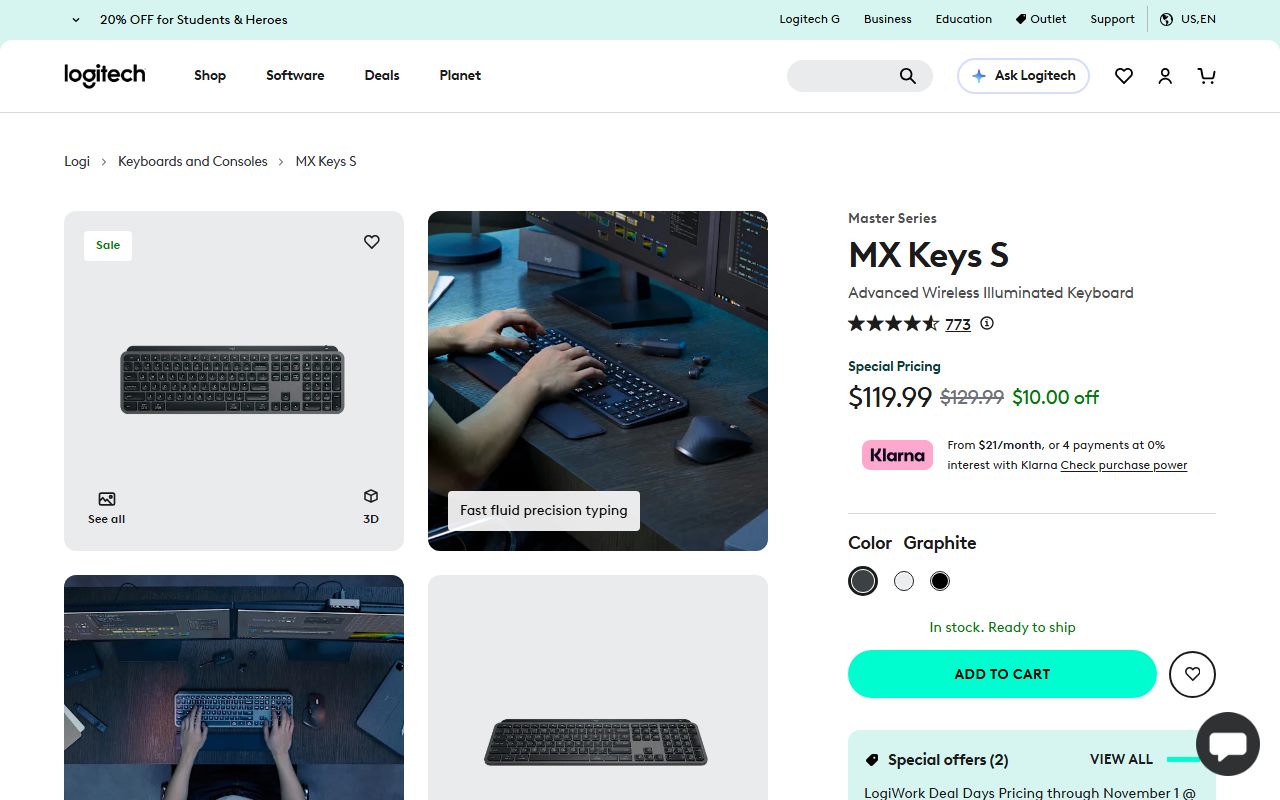
The Logitech MX Keys S is a full-size, low-profile wireless keyboard with backlit keys that switch on as your hands approach. On October 21, 2026 Logitech's US store listed it at $119.99, a LogiWork Deal Days price running through November 1, against a $129.99 list. Logitech's spec tab lists 430.2 x 131.63 x 20.5 mm and 810 g, a 1,500 mAh rechargeable battery rated for up to 10 days with backlighting on or up to 5 months with it off, Easy-Switch for up to three devices, a 10 m range, and both Bluetooth Low Energy and a Logi Bolt receiver, which is in the box. This is a documentation review built from Logitech's store page, its spec data and its refurbished listing; this site has not typed on the keyboard. On paper it is the natural partner to the MX Master 3S: same software, same three-device switching, same charging port. The weak spots are a 10-day battery with the lights on, a 1-year warranty, and a store page that lists no key travel or switch type.
Visit Logitech MX Keys S
We have no affiliate relationship with this vendor. Link goes to the official site.
Where it is strong
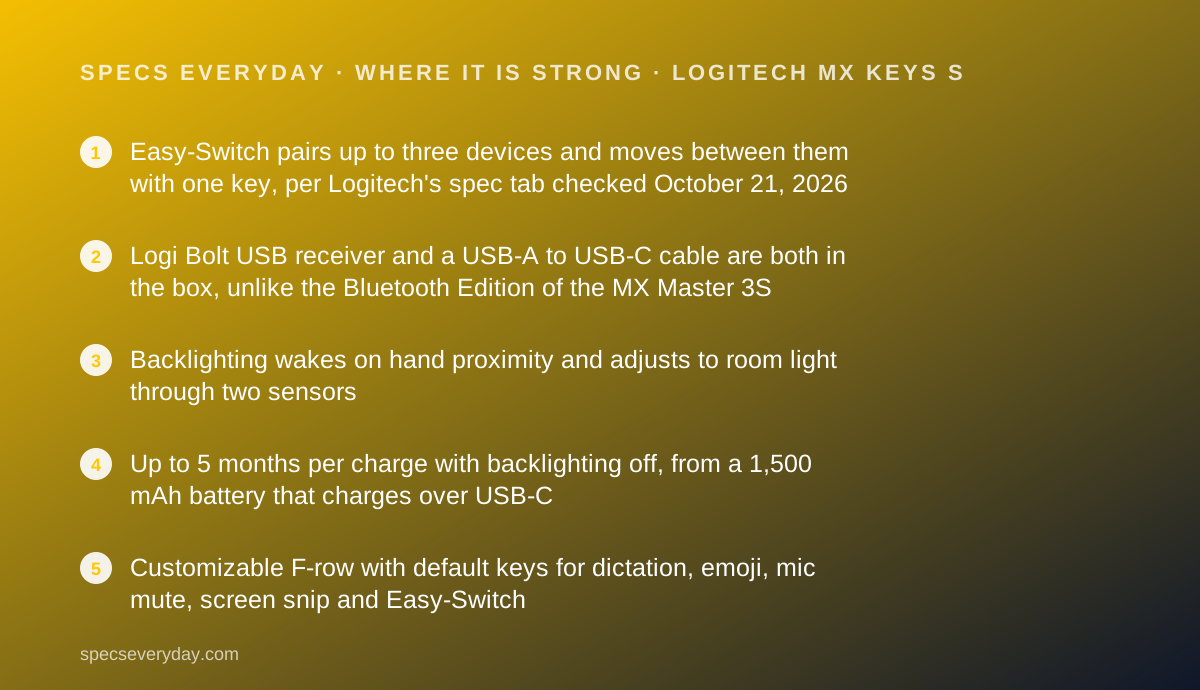
- Easy-Switch pairs up to three devices and moves between them with one key, per Logitech's spec tab checked October 21, 2026
- Logi Bolt USB receiver and a USB-A to USB-C cable are both in the box, unlike the Bluetooth Edition of the MX Master 3S
- Backlighting wakes on hand proximity and adjusts to room light through two sensors
- Up to 5 months per charge with backlighting off, from a 1,500 mAh battery that charges over USB-C
- Customizable F-row with default keys for dictation, emoji, mic mute, screen snip and Easy-Switch
Where it falls short
- Up to 10 days per charge with the default backlight settings, a short interval next to the 70-day MX Master 3S
- 1-year warranty, the term Logitech's refurbished listing says new products carry
- 810 g and 430.2 mm wide: a desk keyboard, not a bag keyboard
- The store page lists no key travel, switch type or key count
- Smart Actions, Flow and other advanced Options+ features work only on recent Windows and macOS
At a glance
| Dimensions | 430.2 x 131.63 x 20.5 mm (16.94 x 5.18 x 0.81 in), width x height x depth |
|---|---|
| Weight | 810 g (28.57 oz) |
| Battery | 1,500 mAh rechargeable Li-Po; up to 10 days with predefined settings, up to 5 months with backlighting off |
| Charging | USB-C; USB-A to USB-C cable included |
| Connection | Bluetooth Low Energy or Logi Bolt USB receiver (included); not compatible with other Logitech receivers |
| Devices | Up to 3, Easy-Switch keys |
| Wireless range | 10 m (33 ft) |
| Backlighting | Hand proximity sensor and ambient light sensor; duration and brightness adjustable in Logi Options+ |
| Receiver | Logi Bolt, 14.4 x 6.11 x 18.65 mm, 1.68 g |
| Compatibility | Bluetooth: Windows 10, 11 or later; macOS 10.15 or later; iPadOS 14 or later; Android 8.0 or later; Linux; ChromeOS and Googlebook |
| Warranty | 1 year (Logitech US store, refurbished MX Keys S listing, October 2026) |
| Price | $119.99 sale through November 1, $129.99 list on logitech.com US, checked October 21, 2026 |
| Pricing note | $119.99 sale (through November 1), $129.99 list on logitech.com US; refurbished $79.99; 1-year warranty (store pages, checked October 21, 2026) |
What the MX Keys S actually is
The MX Keys S is Logitech's full-size productivity keyboard: low-profile, backlit, wireless and built to switch between several computers. It is the keyboard half of the MX line that also includes the MX Master 3S mouse.
Its design ideas are simple. Keys are spherically dished to fit fingertips. The backlight wakes when a hand approaches. Three Easy-Switch keys move it between devices. A USB-C port charges it.
We read Logitech's US store page, the spec data embedded in it and the refurbished listing on October 21, 2026. Nothing here was typed, timed or measured by this site.
Who the MX Keys S is best for
The short version: people who type all day at a desk and use more than one device.
- Hybrid workers with a work laptop and a personal computer on one desk
- Writers, analysts and support staff who type for most of the day
- Mac users with FileVault turned on, who can use the included Logi Bolt receiver
- iPad users who want a full-size keyboard as one of the three paired devices
- People who work in dim rooms and want backlighting that adjusts itself
- Owners of an MX Master 3S who want one app and one charging cable for both
Who should skip it
Some typists will be better served elsewhere.
- Travellers; 810 g and 430.2 mm wide is a desk keyboard
- Mechanical keyboard fans; Logitech sells this as a low-profile keyboard and lists no switch type
- Anyone who wants to charge rarely with the backlight on; the rating is 10 days
The spec sheet, translated
Size and weight. 430.2 mm wide, 131.63 mm deep and 20.5 mm tall, at 810 g. Logitech's page title offers it as full-size, with the MX Keys Mini as the space-saving option.
Battery. A 1,500 mAh rechargeable Li-Po. Logitech rates up to 10 days per charge with predefined settings and up to 5 months with the backlight off.
Connection. Bluetooth Low Energy or the Logi Bolt USB receiver, with a 10 m range. Logitech says the keyboard is not compatible with other Logitech USB receivers.
Lighting. Two sensors: a hand proximity sensor that turns the backlight on and an ambient light sensor that sets its brightness. Caps Lock and battery indicator lights sit on the board.
10 days or 5 months: the backlight decides
The battery rating is really two ratings. With Logitech's predefined backlight settings the keyboard lasts up to 10 days. With the backlight off it lasts up to 5 months, which is roughly 15 times longer, by our arithmetic.
In practice that means a weekly or fortnightly charge for anyone who leaves the lights on, and a charge every few months for anyone who does not. Options+ lets you shorten the backlight duration and lower brightness, which sits between the two.
The keyboard has an on/off switch, so turning it off over a weekend is an option Logitech builds in.
Three devices, Bolt and Bluetooth
Easy-Switch is the reason most buyers pick an MX keyboard. Logitech lists up to three paired devices and a key press to move between them.
The Logi Bolt receiver matters on locked-down work laptops where Bluetooth is disabled. Logitech also warns that FileVault on a Mac can stop Bluetooth devices connecting before you log in, and recommends Bolt in that case.
Unlike the Bluetooth Edition of the MX Master 3S, the MX Keys S box lists a Bolt receiver. The receiver is 1.68 g and 14.4 mm wide, per the spec tab.
A monitor with a KVM switch solves the two-computer problem in hardware. The BenQ PD2706U lists one, which our Dell U2724D vs BenQ PD2706U comparison covers.
The F-row and Smart Actions
Logitech lists default shortcuts across the top row, and Options+ can remap the entire F-row.
- Screen brightness up and down
- Backlight up and down
- Dictation and an emoji menu
- Microphone mute and unmute, useful on video calls
- Media and volume controls
- Easy-Switch keys 1 to 3
- Calculator and screen snip
What Smart Actions and Flow need
Smart Actions chain several steps to one keystroke in Logi Options+. Flow moves the cursor and keyboard focus between computers with a compatible MX mouse.
Logitech's spec data says these advanced features work only on recent Windows and macOS. Googlebook laptops get basic customization in Options+. On other systems the keyboard offers basic functions without software.
Compatibility and layout
Over Bluetooth Logitech lists Windows 10, 11 or later, macOS 10.15 or later, iPadOS 14 or later, Android 8.0 or later, Linux, ChromeOS and Googlebook. Through the Bolt receiver it lists Windows, macOS, Linux, ChromeOS and Googlebook.
The key layout is dual-labelled for Mac and Windows, per Logitech's feature text. The US store variants we read were English US QWERTY in Graphite, Black and Pale Gray.
Charging it on a desk
The box includes a USB-A to USB-C cable. Any spare USB port will charge a keyboard, which draws very little.
The USB-A port on a desk charger is enough. The Anker Prime Charger 100W and UGREEN Nexode 100W each list one, per our reviews, and our USB-C charger guide covers both.
Our USB-C Power Delivery explainer covers why a keyboard needs none of the wattage a laptop does.
Setting it up: what the box and the spec data imply
The spec data points to a short checklist before the first workday.
- Check the box for the Logi Bolt receiver and the USB-A to USB-C cable; Logitech lists both
- Use Bolt on a work laptop with Bluetooth blocked, or on a Mac with FileVault turned on
- Pair the other two Easy-Switch slots over Bluetooth, for example a personal laptop and an iPad
- Install Logi Options+ on Windows or macOS to remap the F-row and set backlight duration
- Charge from any USB port; the battery indicator light warns before it runs out
What the store page does not list
Several numbers keyboard buyers compare were absent from the spec data we read on October 21, 2026: key travel, switch or mechanism type, key count and actuation force. We read the full rendered page, including its embedded spec data, and found none of them.
That does not mean the figures do not exist elsewhere. It means a buyer cannot compare key feel on paper from this page, and neither can we. Logitech describes the feel in words instead: dished keys, increased key stability and reduced noise.
The mute key and video calls
For hybrid workers, the most useful default key may be microphone mute. Logitech lists Mute and Unmute Mic among the default shortcuts and names video calls as its use.
A physical mute key saves hunting for an on-screen button mid-call. Logitech does not list which meeting apps respond to it, so check yours. Our everyday laptop guide covers the laptops this keyboard is most likely to sit beside.
How the pricing is structured
Logitech's US store showed the MX Keys S at $119.99 on October 21, 2026, $10 off a $129.99 list, as LogiWork Deal Days pricing through November 1 at 11:59 pm PDT. It was in stock.
A refurbished MX Keys S was listed at $79.99 against an original $129.99, in Black and in stock. That is $40 below the new sale price, by our arithmetic, with the same stated warranty.
The store also listed an MX Keys S Combo, with an MX Master 3S and an MX Palm Rest, at $199.99.
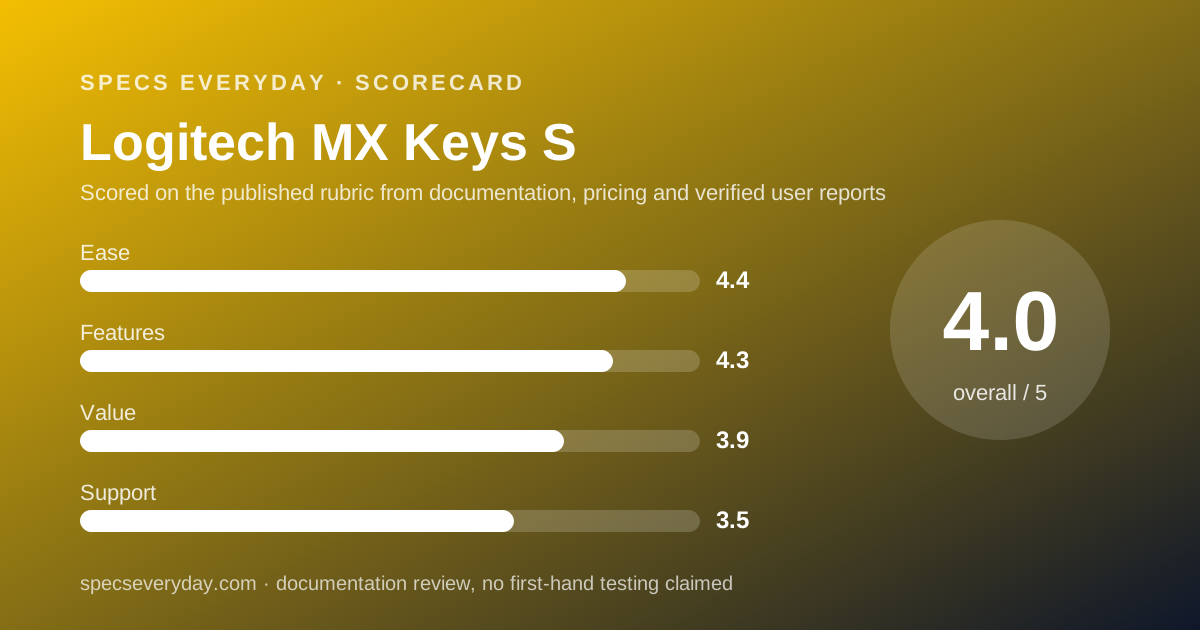
Ease of use: what the 4.4 is built from
Three-device switching, a receiver and a cable in the box, self-adjusting backlight and broad operating system support earn the score. Points come off for the reliance on Options+ for remapping and for advanced features limited to Windows and macOS.
Features: what the 4.3 is built from
Proximity and ambient light sensors, a programmable F-row, Smart Actions, Flow and both Bolt and Bluetooth make a complete office keyboard. The score stops at 4.3 because the page lists no key travel or switch type, and the backlit battery rating is 10 days.
Value: what the 3.9 is built from
$119.99 on sale is fair for what the spec data lists, and the box is complete. The refurbished unit at $79.99 with the same 1-year warranty makes the new price harder to justify for buyers who accept refurbished stock.
Support: what the 3.5 is built from
Logitech's refurbished MX Keys S listing says refurbished units get the same 1-year warranty and Logitech support as new products. That is half the two years the Anker and UGREEN chargers in this category carry. Free 30-day returns help.
What owners report
The MX Keys S page showed 771 reviews, and its embedded summary listed an average of about 4.65 out of 5, read on October 21, 2026.
The review text was still loading in the version we rendered, so we read no individual owner reviews and quote none.
Treat the average as a broad signal of satisfaction, not as evidence about any specific feature.
Materials and footprint Logitech publishes
Logitech's page data lists certified post-consumer recycled plastic in the keyboard at 11% to 26% depending on colour, excluding packaging and the circuit board. It lists low-carbon aluminium in the key module bracket and a carbon footprint of 15.87 kg CO2e.
These are Logitech's own declarations, useful for comparing Logitech products with each other.
Limits stated by the vendor
Battery life varies with use and computing conditions.
Smart Actions, Flow and other advanced Options+ features work only on recent Windows and macOS. The keyboard does not work with older Logitech receivers. FileVault can block Bluetooth before login. Each of these is printed by Logitech, not inferred.
Alternatives
Logitech MX Keys Mini. Choose it if desk space or a bag matters; Logitech's own page points space-savers to it. We did not read its price or spec page on October 21, 2026. Otherwise choose the MX Keys S if you want the full-size board.
Your laptop's keyboard. Choose it if you work undocked. Our everyday laptop guide and the MacBook Air 13 review cover the built-in keyboards we graded. Otherwise choose the MX Keys S if the laptop sits closed or beside a monitor all day.
The MX Keys S Combo. Choose it at $199.99 if you need a mouse too. Otherwise buy the keyboard alone and add a mouse later.
Building the rest of the desk
A keyboard is one piece of a desk that usually also holds a monitor, a laptop and a charger.
Our office monitor guide covers the screen, and the Dell XPS 13 review covers a laptop with only two USB-C ports, where a Bluetooth keyboard saves a port.
Bottom line
The MX Keys S is the safe full-size choice for a multi-device desk: three Easy-Switch slots, Bolt and Bluetooth, a self-adjusting backlight and USB-C charging, with a complete box.
Buy it on sale or refurbished, expect to charge it every week or two with the lights on, and note that the warranty is one year.
Buy it if
- You work across two or three machines - Easy-Switch keys move the keyboard between up to three paired devices.
- Your work laptop blocks Bluetooth or uses FileVault - the Logi Bolt receiver is in the box, and Logitech recommends it for FileVault Macs.
- You already own an MX Master 3S - the same Options+ app, Flow and USB-C charging cover both.
- You can buy at the $119.99 sale price - $10 below list, through November 1, 2026.
Skip it if
- You want to charge once a season with the lights on - Logitech rates 10 days with its predefined backlight settings.
- You need a keyboard for a bag - 810 g and 430.2 mm wide is a desk size; Logitech points space-savers to the MX Keys Mini.
- You care about key feel in numbers - the store page lists no key travel or switch type to compare.
Frequently asked
How long does the MX Keys S battery last?
Logitech states up to 10 days on a full charge with predefined settings, or up to 5 months with backlighting turned off, and notes that battery life varies with use. The battery is a 1,500 mAh rechargeable Li-Po that charges over USB-C, per the spec data checked October 21, 2026.
How many devices can the MX Keys S connect to?
Three. Logitech lists Easy-Switch keys that connect up to three devices and switch between them with one press. Each can pair over Bluetooth Low Energy or, for one computer, through the included Logi Bolt receiver, with a 10 m wireless range.
Does the MX Keys S come with a receiver?
Yes. Logitech's box list on October 21, 2026 shows the keyboard, a Logi Bolt USB receiver, a USB-A to USB-C charging cable and documentation. Logitech notes the keyboard is not compatible with other Logitech USB receivers, such as older ones you may already own.
How much does the Logitech MX Keys S cost?
Logitech's US store listed it at $119.99 on October 21, 2026, a sale price through November 1 against a $129.99 list. A refurbished MX Keys S was listed at $79.99 and in stock, and a combo with the MX Master 3S and a palm rest at $199.99.
Does the MX Keys S work with a Mac and an iPad?
Yes. Logitech lists macOS 10.15 or later and iPadOS 14 or later over Bluetooth, and a dual key layout for Mac and Windows. Options+ customization runs on Windows and macOS only; on iPad, Android, Linux and ChromeOS the keyboard offers basic functions.
What warranty does the MX Keys S have?
One year in the US. Logitech's refurbished MX Keys S listing, checked October 21, 2026, says refurbished units get the same 1-year warranty and Logitech support as new products. The store also lists free returns within 30 days of purchase.
Sources
- Logitech US store: MX Keys S product page and spec data - checked October 21, 2026
- Logitech US store: Refurbished MX Keys S (warranty statement) - checked October 21, 2026
Update history
- October 21, 2026 - First published. Figures from Logitech's US store pages for the MX Keys S and the refurbished MX Keys S, both checked October 21, 2026.
Visit Logitech MX Keys S
We have no affiliate relationship with this vendor. Link goes to the official site.