 Specs

BenQ PD2706U
A 27-inch 4K designer monitor with 90 W USB-C charging, a built-in KVM switch, a hotkey puck and a 3-year warranty at the lowest list price in this cluster
Scored on the published rubric, from documentation, pricing and verified user reports.
Best for: Laptop users who want one USB-C cable for 4K video, data and 90 W of charging, and anyone who switches between two computers at one desk.
Verdict
The BenQ PD2706U is a 27-inch 3840 x 2160 IPS monitor from BenQ's designer line, listed at $399.99 on the US BenQ store on October 16, 2026. The spec page lists 350 cd/m2 typical brightness, 400 cd/m2 HDR peak, 1,200:1 contrast, 100% sRGB, 100% Rec.709 and 95% P3 coverage, a 60 Hz refresh rate, and a USB-C upstream port with 90 W power delivery. It also lists a built-in KVM switch, a Hotkey Puck G2 controller in the box, two 2.5 W speakers and a 110 mm height-adjustable stand. BenQ's US warranty page states three years parts and labour. This is a documentation review built from the BenQ product page, the spec page and the warranty page; this site has not operated the monitor. On paper the PD2706U is the most complete everyday office monitor in this cluster: it is the cheapest, it charges a laptop, it swaps between two machines, and it is covered as long as the Dell. The compromises are 60 Hz and a 1,200:1 contrast figure that the Dell UltraSharp U2724D's IPS Black panel doubles.
Visit BenQ PD2706U
We have no affiliate relationship with this vendor. Link goes to the official site.
Where it is strong
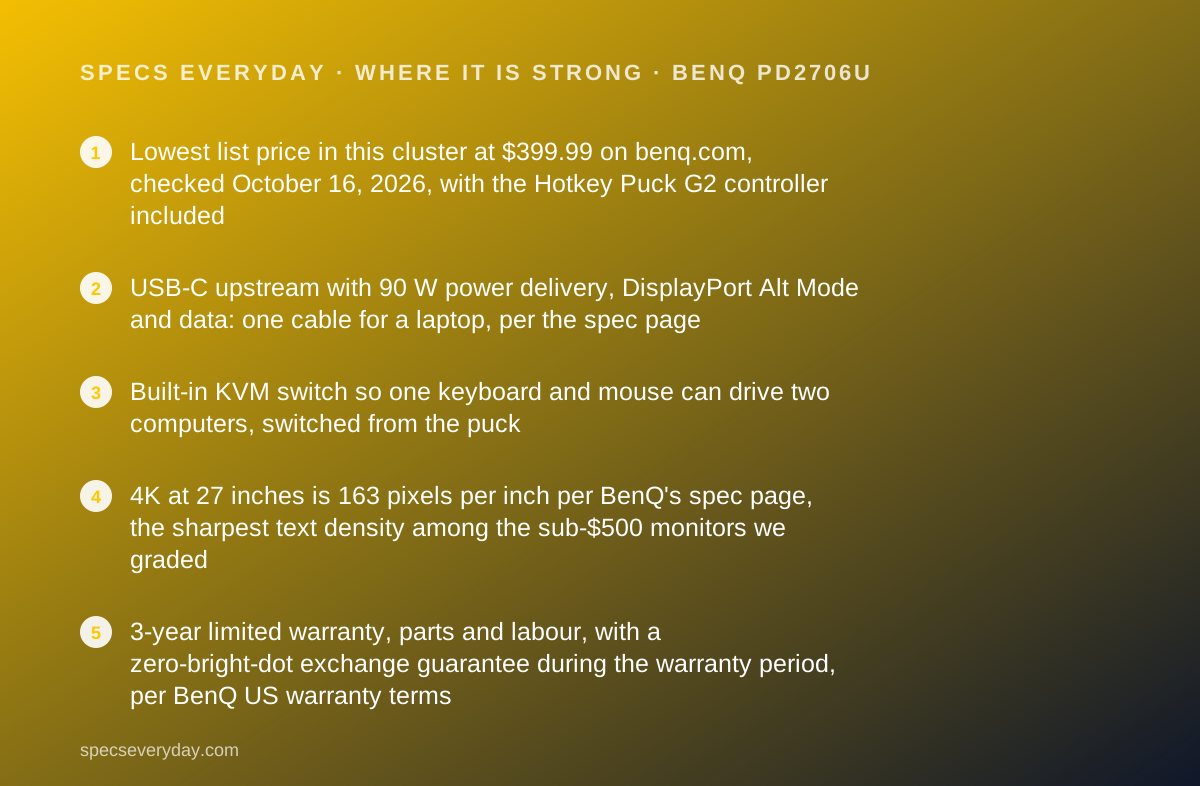
- Lowest list price in this cluster at $399.99 on benq.com, checked October 16, 2026, with the Hotkey Puck G2 controller included
- USB-C upstream with 90 W power delivery, DisplayPort Alt Mode and data: one cable for a laptop, per the spec page
- Built-in KVM switch so one keyboard and mouse can drive two computers, switched from the puck
- 4K at 27 inches is 163 pixels per inch per BenQ's spec page, the sharpest text density among the sub-$500 monitors we graded
- 3-year limited warranty, parts and labour, with a zero-bright-dot exchange guarantee during the warranty period, per BenQ US warranty terms
- Factory calibration report in the box, Delta E 3 or better average, Pantone and Calman validation listed
Where it falls short
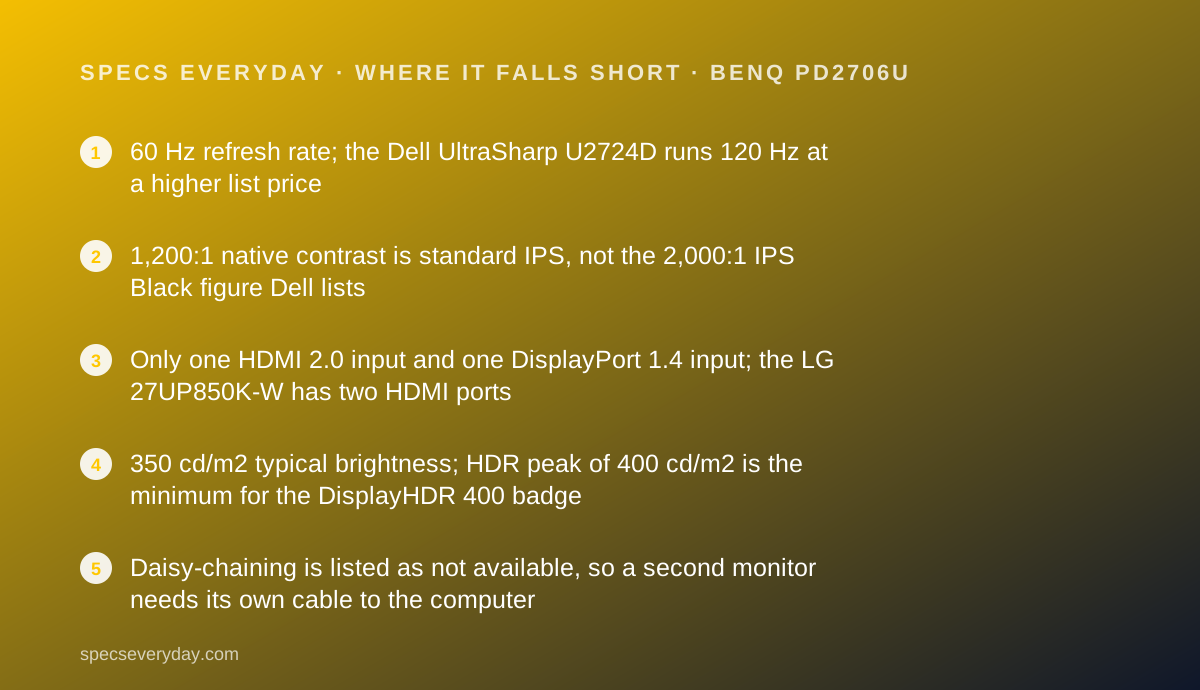
- 60 Hz refresh rate; the Dell UltraSharp U2724D runs 120 Hz at a higher list price
- 1,200:1 native contrast is standard IPS, not the 2,000:1 IPS Black figure Dell lists
- Only one HDMI 2.0 input and one DisplayPort 1.4 input; the LG 27UP850K-W has two HDMI ports
- 350 cd/m2 typical brightness; HDR peak of 400 cd/m2 is the minimum for the DisplayHDR 400 badge
- Daisy-chaining is listed as not available, so a second monitor needs its own cable to the computer
At a glance
| Screen size | 27 in diagonal, 16:9, matte coating, 163 ppi |
|---|---|
| Resolution | 3840 x 2160 (4K UHD) |
| Panel | IPS, LED backlight, 1,200:1 native contrast, 5 ms GtG, 178/178 degree viewing angles |
| Refresh rate | 60 Hz |
| Brightness | 350 cd/m2 typical; 400 cd/m2 peak HDR; HDR10 and VESA DisplayHDR 400 |
| Color gamut | 100% sRGB, 100% Rec.709, 95% P3; Delta E 3 or better average; 1.07 billion colours |
| USB-C power delivery | 90 W on the USB-C upstream port, with DisplayPort Alt Mode video and data |
| Video inputs | 1 x HDMI 2.0, 1 x DisplayPort 1.4, 1 x USB-C (DP Alt Mode) |
| USB hub | 1 x USB-B upstream, 3 x USB 3.2 downstream, 1 x USB-C downstream, headphone jack; built-in KVM switch |
| Stand | Height 110 mm, tilt -5 to 20 degrees, swivel 15 degrees each way, pivot 90 degrees; VESA 100 x 100 mm |
| Speakers | 2 x 2.5 W |
| Weight | 8.3 kg (18.3 lb) with stand; 5.3 kg (11.68 lb) without |
| Power | 45 W typical, 230 W maximum, under 0.5 W sleep (spec page) |
| Warranty | 3 years parts and labour, no advance replacement (BenQ US warranty page, October 2026) |
| List price | $399.99 on benq.com US, checked October 16, 2026 |
| Pricing note | $399.99 on benq.com (US store), Hotkey Puck G2 included, 3-year limited warranty (product page, checked October 16, 2026) |
What the BenQ PD2706U actually is
The PD2706U is a 27-inch 4K monitor in BenQ's designer series, the line BenQ pitches at graphic designers and CAD users rather than office buyers. The US BenQ store listed it at $399.99 on October 16, 2026, which makes it the cheapest of the four 27-inch monitors in this cluster despite the professional label.
The spec page describes a 3840 x 2160 IPS panel at 60 Hz, 350 cd/m2 typical brightness with a 400 cd/m2 HDR peak, 1,200:1 native contrast and coverage of 100% sRGB, 100% Rec.709 and 95% P3. BenQ ships a factory calibration report in the box and lists Pantone and Calman validation.
What makes it an everyday monitor rather than a studio tool is the connection list. The USB-C upstream port carries video, data and 90 W of power to a laptop. A built-in KVM switch lets one keyboard and mouse control two computers, and a wired Hotkey Puck G2 on the desk flips between them.
The Dell UltraSharp U2724D we reviewed first in this cluster is the natural comparison: $40 more, QHD instead of 4K, 120 Hz instead of 60 Hz, deeper contrast, and no USB-C video at all. The two monitors answer different questions, and this review is about which question is yours.
Who the PD2706U is best for
Based on the BenQ spec page, these are the desks where the PD2706U is the right answer.
- Laptop users who want to arrive, plug in one USB-C cable, and have video, keyboard, mouse and charging at once.
- People with a work laptop and a personal desktop who want to share one monitor, keyboard and mouse through the KVM.
- Writers, analysts and developers who want 4K text density at 27 inches for the price of a QHD office panel.
- Occasional photo and video editors who want 95% P3 coverage and a factory calibration report without a studio budget.
- Anyone who wants a 3-year warranty at a sub-$400 list price.
- Users in shared or home offices who want built-in speakers for calls rather than a separate set.
Who should skip it
Three kinds of buyer should look at the Dell UltraSharp U2724D or elsewhere in our monitors topic instead.
- Anyone who wants more than 60 Hz. The Dell runs 120 Hz; the PD2706U does not.
- Anyone who prioritises contrast for dark-mode work. BenQ lists 1,200:1; Dell's IPS Black lists 2,000:1.
- Anyone who needs to chain a second monitor off the first. BenQ lists daisy chain as not available.
The spec sheet, translated
Each line below is from the BenQ spec page read on October 16, 2026, with what it means in practice.
3840 x 2160 at 27 inches, 163 ppi. BenQ prints the pixel density itself. At that density, macOS and Windows both render text with no visible pixel structure at normal viewing distance, and most people run 150% scaling for a workspace equivalent to QHD with sharper type.
60 Hz. The standard office refresh rate. Scrolling is fine; it is simply not as fluid as the 120 Hz Dell. For documents and spreadsheets the difference is a comfort, not a function.
350 cd/m2 typical, 400 cd/m2 HDR peak. Enough for an office with normal lighting. The 400 figure is exactly the minimum for the VESA DisplayHDR 400 badge, so treat HDR as a checkbox rather than a reason to buy.
1,200:1 native contrast. Ordinary IPS. Blacks look dark grey in a dim room, as they do on most office IPS panels. The Dell's IPS Black panel is the exception in this cluster.
100% sRGB, 100% Rec.709, 95% P3, Delta E 3 or better. For documents and the web, sRGB coverage is the number, and it is complete. The P3 figure and the calibration report are what you pay for in the designer line, and at this price they come free.
Ports: one cable for a laptop, one puck for two computers
The spec page lists one HDMI 2.0 input, one DisplayPort 1.4 input, one USB-C upstream with 90 W power delivery and DisplayPort Alt Mode, one USB-B upstream, three USB 3.2 downstream ports, one USB-C downstream port and a headphone jack.
The two upstream ports are the point. Connect a laptop over USB-C and a desktop over DisplayPort plus the USB-B cable, and the built-in KVM lets the three downstream USB ports follow whichever computer is on screen. BenQ says the switch is triggered from the Hotkey Puck G2.
90 W is enough to charge most 13-inch and 14-inch laptops at full speed and to hold a 16-inch machine steady under light load. Laptops that ship with a 140 W adapter will charge more slowly under heavy load. BenQ's page states that Thunderbolt 3 and 4 laptops are compatible with the USB-C port.
The gaps: a single HDMI input, HDMI 2.0 rather than 2.1 (irrelevant at 4K 60 Hz), and no DisplayPort output for daisy-chaining. The Dell UltraSharp U2724D has the DisplayPort out but no USB-C video, so neither monitor wins on every port.
How the pricing is structured
BenQ sells the PD2706U in one configuration at $399.99 on its US store as of October 16, 2026. The Hotkey Puck G2, a calibration report, an I/O cover and cables are listed in the box. There is no tilt-only stand tier and no paid upgrade path.
BenQ also sells a PD2706UA variant with an ergonomic arm instead of the standard stand. The US product page lists it as a related model; we did not read a current US price for it, so we do not quote one.
Against the rest of the cluster on the days we checked each maker's page: the Dell U2724D was $439.99, the LG 27UP850K-W was $349.99 on backorder, and the Apple Studio Display started at $1,599. By our arithmetic the BenQ is $40 under the Dell with 4K and USB-C charging added, and $50 over the LG with a KVM, speakers and two extra warranty years added.
BenQ's own store prices move with promotions, so treat $399.99 as the figure on the day we read it.
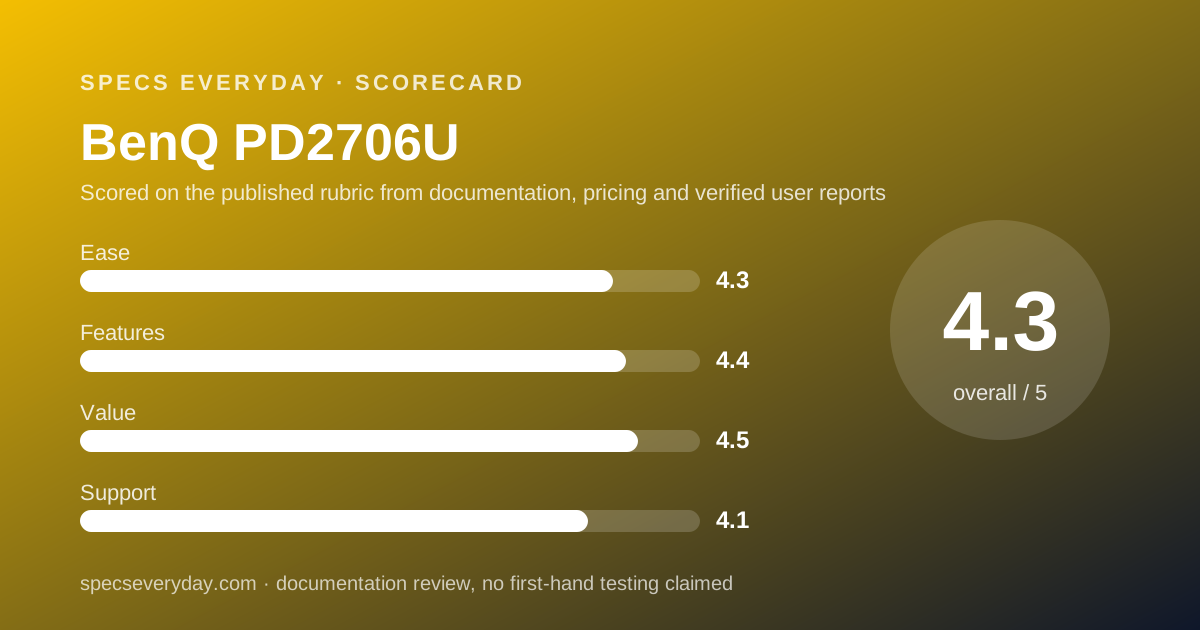
Ease of use: what the 4.3 is built from
Single-cable laptop connection is the biggest ease-of-use feature a monitor can have, and the PD2706U lists it. The KVM and puck take the second-biggest friction, switching between two computers, down to one press.
The stand lists 110 mm of height, tilt from -5 to 20 degrees, 15 degrees of swivel each way and a 90-degree pivot, with a 100 x 100 mm VESA mount. That is a full set, though the swivel range is narrower than the Dell's 45 degrees each way and the height travel is 40 mm shorter.
BenQ lists TUV Rheinland certification for flicker-free and low blue light, plus an ePaper mode for reading. The two 2.5 W speakers handle calls without a headset.
The score is held back slightly by the puck itself, which is a wired accessory that lives on the desk, and by the single HDMI input.
Features: what the 4.4 is built from
The PD2706U lists more useful office features than any other monitor in this cluster at or near its price: 4K, 90 W USB-C, KVM, puck controller, speakers, DisplayHDR 400, a calibration report, PIP and PBP for two sources on one screen, and a full stand.
It loses points for 60 Hz, for standard-IPS contrast, for one HDMI input and for no daisy-chaining. The Apple Studio Display adds a camera, microphones and a six-speaker system, at four times the price. The Dell adds 120 Hz and a DisplayPort out but drops USB-C video entirely.
Value: what the 4.5 is built from
At $399.99 the PD2706U is the cheapest monitor in this cluster and the only one under $450 that lists both 4K and 90 W USB-C charging. Add the KVM and the 3-year warranty and the value score is the highest we gave.
The comparison that matters is with the LG 27UP850K-W at $349.99: the LG is $50 cheaper, slightly brighter at 400 cd/m2 typical, and has two HDMI inputs, but lists a 1-year warranty and no KVM. Two extra warranty years for $50 is a reasonable trade for most buyers.
Against the Dell UltraSharp U2724D, the BenQ wins on price, resolution and USB-C, and loses on refresh rate and contrast.
Support: what the 4.1 is built from
BenQ's US monitor warranty page, read October 16, 2026, states a three-year limited warranty from the purchase date, parts and labour, with no advance replacement. That last clause is the difference from Dell, whose site describes Advanced Exchange service.
BenQ also publishes a pixel policy: a zero-bright-dot guarantee during the warranty period, and a 30-day window for bright sub-pixel defects under stated lighting conditions. Few monitor makers print that policy in public.
The product page links to a manuals and downloads section and a repair request form. We did not read a verified user-review source for this specific model on the day of writing, so we do not quote reported response times.
Limits stated by the vendor
The BenQ pages carry these limits. Daisy chain is listed as not available. Signal cables in the box may vary by region. The warranty excludes damage from misuse, unauthorised modification and unauthorised service, and requires proof of purchase and an RMA number for returns.
The 90 W power delivery figure is the port's maximum; what a laptop draws depends on the laptop. BenQ does not list a HDMI 2.1 port or any refresh rate above 60 Hz.
Alternatives
Dell UltraSharp U2724D. Choose the Dell if your computer is a desktop or a docked laptop and you want 120 Hz and 2,000:1 contrast more than 4K. Otherwise choose the BenQ for USB-C charging and 4K at $40 less. Our Dell UltraSharp U2724D review has the full spec sheet.
Dell UltraSharp U2724DE. Choose it if you want a Thunderbolt hub with Ethernet and 90 W charging in a QHD 120 Hz panel, and can pay $599.99 as listed on dell.com on October 16, 2026. Otherwise the BenQ gives you 90 W and 4K for $200 less.
A 27-inch 4K USB-C monitor with a 1-year warranty. Choose one if $50 matters more than two extra warranty years and a KVM; our monitors topic lists the ones we have graded. Otherwise the BenQ is the safer buy.
Bottom line
The BenQ PD2706U is the everyday office monitor we would point most laptop users to in this cluster: 4K at 163 ppi, one USB-C cable with 90 W charging, a KVM for a second computer, speakers, a full stand and a 3-year warranty, for $399.99 on benq.com as of October 16, 2026.
It is a 60 Hz, 1,200:1 panel, so buyers who want a smoother desktop or deeper blacks should read our Dell UltraSharp U2724D review before deciding.
This is a documentation review. Figures are BenQ's, read from benq.com on October 16, 2026, and may have changed since.
Buy it if
- You plug a laptop in and out every day and want one cable - the USB-C upstream carries 4K video, data for the hub and 90 W of charging, per the spec page.
- You run two computers at one desk - the KVM switch and Hotkey Puck G2 let one keyboard and mouse jump between a work laptop and a personal desktop.
- You want 4K text density at the lowest price in this cluster - $399.99 undercuts the Dell UltraSharp U2724D by $40 while adding USB-C charging and 4K.
- You want a long warranty without paying the Apple price - 3 years parts and labour, matching the Dell.
Skip it if
- You want a high refresh rate - the PD2706U is 60 Hz; the Dell UltraSharp U2724D is 120 Hz.
- You want the deepest blacks for dark-mode work - 1,200:1 against the Dell's 2,000:1 IPS Black figure.
- You need two HDMI devices connected at once - there is one HDMI input; the second device goes through DisplayPort or USB-C.
Frequently asked
Does the BenQ PD2706U charge a MacBook or Windows laptop?
Yes, according to the spec page: the USB-C upstream port lists 90 W power delivery along with DisplayPort Alt Mode video and data. BenQ's product page also states that Thunderbolt 3 and 4 laptops are compatible with that port. Laptops that draw more than 90 W under load may still discharge slowly.
How much does the BenQ PD2706U cost?
The US BenQ store listed it at $399.99 on October 16, 2026, with the Hotkey Puck G2 controller, a calibration report and cables in the box. That was the lowest list price of the four 27-inch monitors in this cluster on the days we checked their maker pages.
Is the PD2706U good for office work or only for designers?
BenQ sells it as a designer monitor, but the spec list reads like an office monitor: 4K text density, USB-C charging, KVM, speakers, a height-adjustable stand and TUV flicker-free and low-blue-light certifications. Nothing in it is wasted on a spreadsheet user except the Pantone validation.
What is the Hotkey Puck G2?
A wired dial controller that sits on the desk, included with the PD2706U per the product page. BenQ lists a dial for brightness, contrast and volume, three function keys and a rotation key for shortcuts, and it is the quick way to flip the KVM between two computers.
What warranty does BenQ give on the PD2706U?
BenQ's US monitor warranty page, read October 16, 2026, states three years from the purchase date for parts and labour, with no advance replacement. It also lists a zero-bright-dot guarantee: one bright pixel qualifies for an exchange during the warranty period.
Can I daisy-chain a second monitor from the PD2706U?
No. BenQ's product page lists daisy chain as not available for this model. A second monitor needs its own cable to the computer, or a dock. The Dell UltraSharp U2724D, by contrast, lists a DisplayPort 1.4 output for chaining.
Sources
- BenQ PD2706U product page (US) - checked October 16, 2026
- BenQ PD2706U specifications page (US) - checked October 16, 2026
- BenQ US monitor warranty information - checked October 16, 2026
Update history
- October 16, 2026 - First published from the BenQ US product, spec and warranty pages.
Visit BenQ PD2706U
We have no affiliate relationship with this vendor. Link goes to the official site.