 Specs
Dell U2724D vs BenQ PD2706U: which office monitor to buy
Short answer: the BenQ PD2706U is the better everyday office monitor for anyone who plugs in a laptop, because its USB-C port carries 4K video, data and 90 W of charging and it costs $399.99; the Dell UltraSharp U2724D is the better monitor for a desktop PC or a docked laptop, because it runs QHD at 120 Hz on an IPS Black panel rated at 2,000:1 contrast for $439.99. Both list three-year warranties. This comparison is built from the dell.com and benq.com product and spec pages, all read October 16, 2026, not from first-hand use. Our full Dell UltraSharp U2724D review and BenQ PD2706U review have the line-by-line detail.
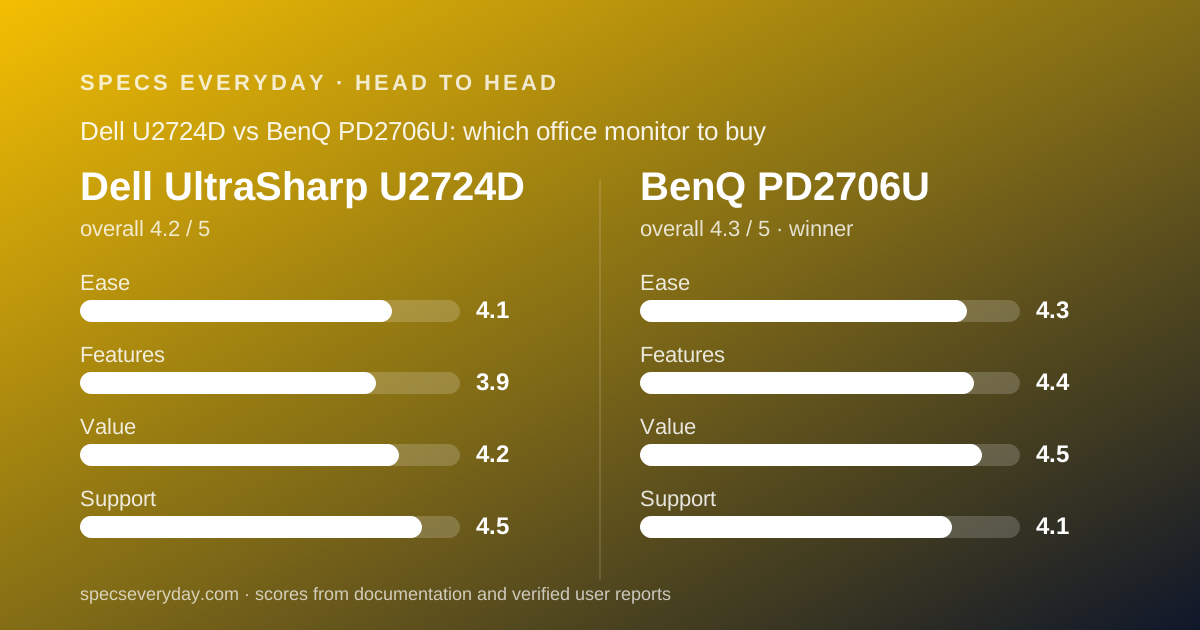
 4.2Dell UltraSharp U2724D
 4.3BenQ PD2706U
Specification by specification
| Spec | Dell UltraSharp U2724D | BenQ PD2706U |
|---|---|---|
| List price (maker's US page, Oct 16, 2026) | $439.99 | $399.99 |
| Resolution and density | 2560 x 1440, about 109 ppi (editorial arithmetic) | 3840 x 2160, 163 ppi (BenQ spec page) |
| Panel and contrast | IPS Black, 2,000:1 native | IPS, 1,200:1 native |
| Refresh rate | 120 Hz | 60 Hz |
| Brightness | 350 cd/m2 typical, no HDR | 350 cd/m2 typical, 400 peak; HDR10, DisplayHDR 400 |
| Colour coverage (factory claims) | 100% sRGB, 100% BT.709, 98% DCI-P3, Delta E under 2 | 100% sRGB, 100% Rec.709, 95% P3, Delta E 3 or better |
| USB-C video and laptop charging | None; USB-C upstream is data only (10 Gbps) | Yes; 90 W power delivery with DisplayPort Alt Mode |
| Video inputs | 1 x HDMI 2.1, 1 x DisplayPort 1.4 in, 1 x DisplayPort 1.4 out | 1 x HDMI 2.0, 1 x DisplayPort 1.4, 1 x USB-C |
| USB hub | 3 x USB-A 10 Gbps (one BC1.2), 1 x USB-C 15 W | 3 x USB 3.2, 1 x USB-C downstream, USB-B upstream; KVM switch |
| Daisy-chain a second monitor | Yes, DisplayPort 1.4 out | Not available (BenQ page) |
| Speakers | None listed; audio line out | 2 x 2.5 W; headphone jack |
| Stand | Height 150 mm, tilt -5 to 21, swivel 45 each way, pivot 90; VESA 100 | Height 110 mm, tilt -5 to 20, swivel 15 each way, pivot 90; VESA 100 |
| Desk controller | None | Hotkey Puck G2 included |
| Warranty | 3-year limited; Advanced Exchange described on dell.com | 3 years parts and labour, no advance replacement; zero-bright-dot guarantee |
| Our overall score | 4.2 (ease 4.1, features 3.9, value 4.2, support 4.5) | 4.3 (ease 4.3, features 4.4, value 4.5, support 4.1) |
The short answer
Two 27-inch office monitors from business-focused lines, forty dollars apart, built for different desks.
- The BenQ PD2706U is best for laptop users who want one USB-C cable for video, data and 90 W of charging, anyone sharing a monitor between two computers through its KVM, and anyone who wants 4K text density at the lowest price in this cluster.
- The Dell UltraSharp U2724D is best for desktop PCs and docked laptops, for people who read dark-mode text all day and want 2,000:1 contrast, and for anyone who values 120 Hz and a DisplayPort output for a second monitor.
- Winner for everyday office work: the BenQ PD2706U, because most office desks in 2026 have a laptop on them, and the Dell U2724D cannot connect to one over USB-C at all.
- Documentation disclaimer: every figure here is from dell.com or benq.com as read on October 16, 2026. This site has not operated either monitor.
The USB-C port decides it before anything else
The single most important line on either spec sheet is Dell's description of the U2724D's USB-C port: upstream, data only, 10 Gbps. It accepts no video signal and delivers no power. Dell sells that capability as a separate model, the UltraSharp U2724DE, listed at $599.99 on dell.com on October 16, 2026.
The BenQ PD2706U's USB-C port is listed as upstream with 90 W power delivery, DisplayPort Alt Mode video and data. A laptop plugged in with one cable gets a 4K picture, charging, and the monitor's USB hub.
If your computer is a laptop that sits on the desk without a dock, this comparison is over. The BenQ does the job and the Dell does not. The rest of this article is for people whose computer connects over HDMI or DisplayPort, where the Dell gets to argue its case.
For a laptop that already lives in a dock, the dock supplies video and power, and the Dell's missing USB-C feature costs nothing. That buyer should read on.
Resolution: the BenQ is sharper, the Dell is smoother
The BenQ lists 3840 x 2160 at 163 pixels per inch. The Dell lists 2560 x 1440, which works out to about 109 pixels per inch by our arithmetic. At a normal desk distance the BenQ's text has no visible pixel structure; the Dell's is sharp but not in the same class.
The Dell answers with 120 Hz over HDMI 2.1 and DisplayPort 1.4. The BenQ is 60 Hz. Cursor movement, scrolling and window dragging look noticeably smoother at 120 Hz, and anyone who has run a high-refresh laptop screen will notice the drop back to 60.
For documents, spreadsheets, code and email, the two advantages roughly cancel: 4K makes the letters crisper, 120 Hz makes the page move more fluidly. For photo and video work, the BenQ's 4K wins outright. For anyone sensitive to motion, the Dell's 120 Hz wins outright.
The practical scaling note: most people will run the BenQ at 150% in Windows or the default Retina-style scaling in macOS, which gives a workspace the same size as the Dell's native QHD with sharper type.
Panel: the Dell lists twice the contrast
Dell calls the U2724D's panel IPS Black and lists 2,000:1 native contrast. BenQ lists a standard IPS panel at 1,200:1. Both are factory figures, not measurements by this site.
In use that gap shows up in dark areas: dark-mode editors, black text on grey, the letterbox bars of a video. On a 1,200:1 panel in a dim room, black reads as dark grey. On a 2,000:1 panel it reads darker. Neither approaches an OLED, but the Dell's figure is the best in this four-monitor cluster.
Brightness is a tie at 350 cd/m2 typical. BenQ adds a 400 cd/m2 HDR peak and the VESA DisplayHDR 400 badge; Dell lists no HDR at all. DisplayHDR 400 is the entry tier and on a 350-nit panel it is a label rather than an HDR experience, so we do not weight it heavily.
Colour claims are close: Dell lists 98% DCI-P3 with a Delta E under 2; BenQ lists 95% P3 with a Delta E of 3 or better plus a printed calibration report, Pantone validation and Calman verification. For office work both are more than enough. For colour-critical work, the BenQ's report and validations are the more useful documentation, even though the Dell's raw numbers are slightly higher.

Ports and hub: the BenQ has the KVM, the Dell has the DisplayPort out
The Dell lists one HDMI 2.1, one DisplayPort 1.4 in, one DisplayPort 1.4 out, a data-only USB-C upstream, three USB-A ports at 10 Gbps (one with BC1.2 charging), one USB-C downstream at 15 W, and an audio line out.
The BenQ lists one HDMI 2.0, one DisplayPort 1.4, one USB-C upstream with 90 W, one USB-B upstream, three USB 3.2 downstream, one USB-C downstream, a headphone jack and a built-in KVM switch controlled from the Hotkey Puck G2.
The BenQ's two upstream paths plus the KVM mean one keyboard and mouse can serve a USB-C laptop and a DisplayPort desktop, switched from the puck. The Dell has one upstream path and no KVM.
The Dell's DisplayPort output lets a second monitor chain from the first with one cable to the computer. BenQ lists daisy chain as not available on the PD2706U.
Both have a single HDMI input. The LG 27UP850K-W in this cluster has two, if that matters to you.
Pricing: the BenQ costs $40 less and includes more
On October 16, 2026, benq.com listed the PD2706U at $399.99 and dell.com listed the U2724D at $439.99. Both come in one configuration with the height-adjustable stand and cables; the BenQ adds the Hotkey Puck G2 and a calibration report in the box.
By our arithmetic the BenQ is $40 cheaper and adds 4K, USB-C charging, a KVM, speakers and a desk controller. The Dell's $40 premium buys 120 Hz, 2,000:1 contrast, a DisplayPort output and 40 mm more height travel.
The comparison changes if you need single-cable charging from Dell: the U2724DE at $599.99 is $200 more than the BenQ for a QHD 120 Hz panel with a Thunderbolt hub and Ethernet.
Both makers run promotions, so these are the prices on the day we read them. The Apple Studio Display, for reference, started at $1,599 on the same day.
Stand and ergonomics: the Dell adjusts further
Dell lists 150 mm of height, tilt from -5 to 21 degrees, swivel of 45 degrees each way and a 90-degree pivot. BenQ lists 110 mm of height, tilt from -5 to 20 degrees, swivel of 15 degrees each way and a 90-degree pivot. Both have 100 x 100 mm VESA mounts.
The Dell's extra 40 mm of height and triple the swivel range matter on a shared desk or a sit-stand setup. On a fixed desk for one person, both ranges are enough.
Both list eye-comfort certifications: Dell shows a 5-star Eye Comfort rating and an ambient light sensor; BenQ lists TUV Rheinland flicker-free and low-blue-light certification and an ePaper reading mode.
BenQ's two 2.5 W speakers handle calls; the Dell lists no speakers, only a line out, so a desktop user needs separate audio.
Warranty and support: three years each, with one difference
Dell's product page lists a 3-year limited hardware warranty, and dell.com describes Advanced Exchange service after remote diagnosis, where a replacement ships before the original is returned, subject to country availability.
BenQ's US monitor warranty page lists three years from purchase, parts and labour, with no advance replacement. It adds a zero-bright-dot guarantee: one bright pixel qualifies for an exchange during the warranty period.
The practical difference is downtime. Dell's described process can put a replacement on your desk before you ship the faulty unit; BenQ's requires an RMA and a return first. BenQ's pixel policy is the more generous document. Both are far ahead of the one-year terms LG and Apple list on their 27-inch panels.
We did not read a verified user-review source for either specific model on October 16, 2026, so we do not quote reported repair times.
What verified users report
We looked for a verified owner-review source for each exact model on the day of writing and did not find one we could read and attribute. Retailer pages with aggregated star ratings do not identify which variant was reviewed, and we do not quote search-result snippets.
When a readable source appears, this section will be updated with the month it was checked. Until then, the comparison rests on the two makers' spec sheets alone.
By job: which monitor fits which desk
The spec sheets sort cleanly by the kind of work on the desk.
A programmer or analyst on a tower PC: the Dell. Dark-mode editors and terminals benefit most from the 2,000:1 contrast claim, 120 Hz makes long scrolling sessions easier on the eyes, and the DisplayPort output adds a second monitor later with one cable to the PC.
A manager or consultant with a laptop that travels: the BenQ. One USB-C cable on arrival, 90 W of charging, the hub for a keyboard and mouse, and speakers for calls without unpacking a headset.
Someone with a work laptop and a personal desktop on the same desk: the BenQ, without much debate. The KVM and the puck are built for exactly that setup, and the Dell has no equivalent.
An occasional photo or video editor: the BenQ, for 4K density, the 95% P3 coverage and the printed calibration report. The Dell's 98% DCI-P3 figure is slightly higher on paper, but QHD density is the limiting factor for image work.
A shared hot desk where any laptop may turn up: the BenQ, because USB-C video and charging is the one connection every modern laptop has. The Dell would need a dock at the desk.
In every case the figures are the makers' own, read October 16, 2026, and the right answer changes if either price moves more than about $50.
Choose the Dell UltraSharp U2724D if
The Dell is the right pick for a specific desk.
- Your computer connects over HDMI or DisplayPort, because it is a desktop or a laptop in a dock, so the missing USB-C video costs you nothing.
- You read dark-mode text for hours, and 2,000:1 contrast matters more to you than 4K density.
- You want 120 Hz for smoother scrolling and cursor movement.
- You plan a second monitor and want to chain it from the DisplayPort output.
Choose the BenQ PD2706U if
The BenQ is the right pick for most other desks.
- Your computer is a laptop and you want one USB-C cable for video, data and 90 W of charging.
- You switch between two computers and want the KVM and puck to move your keyboard and mouse between them.
- You want 4K text and image density at the lowest price in this cluster.
- You want speakers, a calibration report and a pixel guarantee included at $399.99.
Bottom line
For everyday office work in 2026, where the computer is usually a laptop, the BenQ PD2706U wins: 4K, 90 W USB-C, a KVM, speakers and a three-year warranty for $399.99 on benq.com as of October 16, 2026.
The Dell UltraSharp U2724D is the better monitor for a desktop PC or a docked laptop, with 120 Hz, IPS Black contrast and a DisplayPort output for $439.99, and it is the one we would put in front of a programmer or an analyst on a tower PC.
If you want both the Dell's panel and single-cable charging, the answer is the U2724DE at $599.99, not this U2724D. The other two 27-inch monitors in this cluster, the LG 27UP850K-W and the Apple Studio Display, sit either side of these two on price and are reviewed separately.
Frequently asked
Can the Dell U2724D charge a laptop like the BenQ PD2706U?
No. Dell's spec table lists the U2724D's USB-C port as upstream data only at 10 Gbps, with no video and no power delivery. The BenQ PD2706U lists 90 W power delivery with DisplayPort Alt Mode. Dell's single-cable equivalent is the U2724DE at $599.99 on dell.com, October 16, 2026.
Which is cheaper, the Dell U2724D or the BenQ PD2706U?
The BenQ, by $40 at list: $399.99 on benq.com against $439.99 on dell.com, both checked October 16, 2026. Both include a height-adjustable stand and a three-year warranty; the BenQ also includes the Hotkey Puck G2 controller and a calibration report.
Is QHD at 120 Hz better than 4K at 60 Hz for office work?
It depends on what you look at. 4K at 163 ppi gives sharper text and is better for photos and video. 120 Hz gives smoother scrolling and cursor movement. For documents and spreadsheets the two roughly cancel; for image work pick 4K, for motion sensitivity pick 120 Hz.
Which monitor is better for two computers at one desk?
The BenQ PD2706U. It lists a built-in KVM switch with two upstream paths (USB-C and USB-B), so one keyboard and mouse follow whichever computer is on screen, switched from the included Hotkey Puck G2. The Dell U2724D lists one upstream path and no KVM.
Which has the better warranty?
Both list three years. Dell's site describes Advanced Exchange service, which can ship a replacement before you return the original, subject to country availability. BenQ's warranty page lists parts and labour with no advance replacement but adds a zero-bright-dot exchange guarantee. Dell is faster on paper; BenQ is more generous on pixels.
Sources
- Dell UltraSharp 27 Monitor U2724D product page and spec table - checked October 16, 2026
- BenQ PD2706U specifications page (US) - checked October 16, 2026
- BenQ US monitor warranty information - checked October 16, 2026
- Dell.com search results for U2724D and U2724DE (prices) - checked October 16, 2026
Visit Dell UltraSharp U2724D
We have no affiliate relationship with this vendor. Link goes to the official site.
Visit BenQ PD2706U
We have no affiliate relationship with this vendor. Link goes to the official site.