 Specs
The 4 best monitors for everyday office work (2026)
Short answer: for most people working at a desk with a laptop, the best everyday office monitor in our October 2026 cluster is the BenQ PD2706U, because one USB-C cable carries 4K video, data and 90 W of charging, it has a KVM for a second computer, and it lists at $399.99 with a three-year warranty. Pick the Dell UltraSharp U2724D instead if your computer is a desktop or a docked laptop and you want 120 Hz and 2,000:1 contrast. Pick the LG 27UP850K-W if $349.99 is the ceiling. Pick the Apple Studio Display only if you own an Apple silicon Mac and want 5K, a camera and speakers in one piece of glass for $1,599 and up. We compared four spec sheets, four price pages and three warranty pages, all read October 16, 2026; see [how we picked](#how-we-picked) for the rubric.
Our picks
- Best overall for everyday office work: BenQ PD2706U
- Best for desktop PCs and docked laptops: Dell UltraSharp U2724D
- Best budget 4K with USB-C: LG UltraFine 27UP850K-W
- Best for Apple silicon Mac owners: Apple Studio Display
The best office monitors at a glance
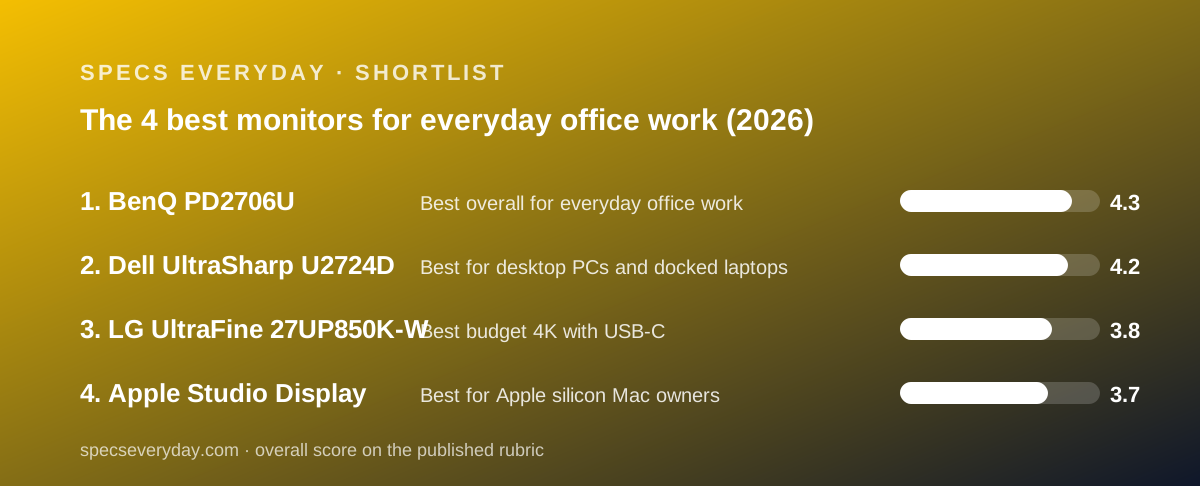
Four 27-inch monitors, graded from their makers' spec sheets and price pages on October 16, 2026. The links go to our full reviews.
- BenQ PD2706U - best overall: 4K, 90 W USB-C, KVM, 3-year warranty, $399.99.
- Dell UltraSharp U2724D - best for desktops and docked laptops: QHD at 120 Hz, IPS Black 2,000:1, DisplayPort out, 3-year warranty, $439.99.
- LG 27UP850K-W - best budget 4K with USB-C: 400 cd/m2, two HDMI, 90 W USB-C, 1-year warranty, $349.99.
- Apple Studio Display - best for Apple silicon Macs: 5K at 218 ppi, 600 nits, camera and speakers, Thunderbolt 5, from $1,599.
Scores out of 5 on our rubric: BenQ 4.3, Dell 4.2, LG 3.8, Apple 3.7. The gap between first and second is small and depends almost entirely on whether your computer connects over USB-C.
Who this guide is for
This guide is for people buying one 27-inch monitor for a desk where the work is documents, spreadsheets, email, code, video calls and the occasional photo. It is not for gamers, who want higher refresh rates than three of these four offer, and not for colour-critical video work, which needs a different class of panel.
We limited the cluster to 27 inches because it is the size that fits a normal desk, runs QHD and 4K at comfortable scaling, and is where the four big office brands put their main models. Five spec rows decide most of what follows: panel and contrast, pixels per inch, brightness, what the USB-C port does, and warranty.
How we picked
We did not run tests of our own; grades come from documentation, pricing pages and verified user reports checked on October 16, 2026. Specifically, we read each maker's US product page and spec table, each maker's US store price, and the published warranty terms from Dell, BenQ, LG and Apple.
Single-cable laptop connection carried the most weight in the ease score. A USB-C port with 90 W or more of power delivery and DisplayPort Alt Mode means a laptop plugs in once. A monitor without it needs a dock, which is a second purchase and a second cable.
Pixel density, contrast class and refresh rate carried the most weight in features. 4K at 27 inches is 163 ppi; QHD is about 109. IPS Black at 2,000:1 is a different class from standard IPS at 1,200:1. 120 Hz is a different class from 60 Hz.
Warranty length counted in value, not just support. Three years of cover on a $400 monitor is worth more than a 50 cd/m2 brightness difference, so a one-year monitor had to be meaningfully cheaper to rank.
We excluded discontinued models. The LG 27UP850N-W we set out to include is marked discontinued on lg.com, so its successor the 27UP850K-W takes its place. We also excluded any model whose maker page we could not read on the day of writing.
We found no readable verified owner-review source for these four exact models on October 16, 2026, and we do not quote search snippets or retailer star ratings. Each review says so.
Best overall for everyday office work: BenQ PD2706U
The BenQ PD2706U is the monitor we would put on most office desks in this cluster. BenQ's US store listed it at $399.99 on October 16, 2026, the second-lowest price of the four, and its spec sheet covers more of an ordinary workday than any other.
The 27-inch 3840 x 2160 IPS panel is listed at 350 cd/m2 typical, 400 cd/m2 HDR peak, 1,200:1 contrast, 100% sRGB, 100% Rec.709 and 95% P3, with a Delta E of 3 or better and a calibration report in the box. Refresh is 60 Hz. BenQ prints the pixel density: 163 ppi.
The connections are the reason it ranks first. One USB-C upstream port carries video, data and 90 W of power to a laptop. A second upstream path over USB-B plus a built-in KVM switch means a desktop can share the same keyboard and mouse, switched from the included Hotkey Puck G2. Three USB 3.2 ports, one USB-C downstream, one HDMI 2.0, one DisplayPort 1.4 and a headphone jack complete the panel.
The stand offers 110 mm of height, tilt from -5 to 20 degrees, 15 degrees of swivel each way and a pivot. Two 2.5 W speakers handle calls. BenQ's US warranty page lists three years parts and labour with a zero-bright-dot exchange guarantee.
The limits: 60 Hz, standard IPS contrast, a single HDMI input, and no daisy-chaining. If any of those is your deciding row, the Dell below is the answer.
Why it sits at #1: it is the only monitor in the cluster that lists USB-C charging, a KVM, speakers and a three-year warranty together, and it does so at $40 less than the Dell. Read our full BenQ PD2706U review. Deciding between this and the Dell? Read Dell U2724D vs BenQ PD2706U.
Best for desktop PCs and docked laptops: Dell UltraSharp U2724D
The Dell UltraSharp U2724D has the best panel for text in this cluster and the one connection gap that keeps it from first place. Dell.com listed it at $439.99 on October 16, 2026.
The 27-inch 2560 x 1440 IPS Black panel is listed at 2,000:1 native contrast, 350 cd/m2, 100% sRGB, 98% DCI-P3 and a Delta E under 2, at 120 Hz over HDMI 2.1 or DisplayPort 1.4. That contrast figure is double the BenQ's and the LG's, and the refresh rate is double all three rivals.
The gap is the USB-C port, which Dell lists as upstream data only at 10 Gbps. It carries no video and no power. A laptop needs a dock or must use HDMI or DisplayPort. Dell's single-cable version is the U2724DE at $599.99 on the same day.
Where the Dell wins outright: the stand lists 150 mm of height and 45 degrees of swivel each way, the most adjustment here; a DisplayPort 1.4 output chains a second monitor; the hub has three 10 Gbps USB-A ports; and Dell's site describes a three-year warranty with Advanced Exchange service, which ships a replacement before the faulty unit goes back.
The other limits: no speakers, no HDR tier, one HDMI input, and QHD density of about 109 ppi by our arithmetic.
Why it sits at #2: on a desktop PC it would be our first pick, with the best contrast, the only 120 Hz panel and the strongest warranty service, but the missing USB-C video rules it out for the laptop desks that make up most offices. Read our full Dell UltraSharp U2724D review and the Dell U2724D vs BenQ PD2706U comparison.
Best budget 4K with USB-C: LG 27UP850K-W
The LG UltraFine 27UP850K-W is the cheapest 4K USB-C monitor in this cluster and the brightest under $500. Lg.com listed it at $349.99 on October 16, 2026, shown as $30 off $379.99, on backorder with shipping expected from October 19.
It replaces the 27UP850N-W, which lg.com marks discontinued. The spec table lists a 27-inch 3840 x 2160 IPS panel at 60 Hz, 400 cd/m2 typical and 320 minimum, 1,200:1 contrast, 95% DCI-P3, HDR10 with VESA DisplayHDR 400, factory calibration and hardware calibration support.
Inputs are the broadest here: two HDMI 2.0, one DisplayPort 1.4, one USB-C with 90 W power delivery, two USB 3.0 downstream ports and a headphone jack. Built-in speakers are listed without a wattage. The stand lists 110 mm of height, tilt from -5 to 20 degrees and a pivot, but no swivel.
The limits: a one-year parts-and-labour warranty, no KVM, no DisplayPort output, 60 Hz and standard IPS contrast. The backorder status on the day we checked is worth confirming before you buy.
Why it sits at #3: it undercuts the BenQ by $50 and beats it on brightness and HDMI count, but the BenQ's two extra warranty years and KVM are worth more than $50 to most buyers. Read our full LG 27UP850K-W review.
Best for Apple silicon Mac owners: Apple Studio Display
The 2026 Apple Studio Display has the best spec sheet in this cluster and the narrowest audience. Apple's store listed six configurations on October 16, 2026, from $1,599 with the tilt stand or VESA adapter to $2,299 with nano-texture glass and the height stand.
The 27-inch 5120 x 2880 panel is listed at 218 pixels per inch, 600 nits, one billion colours, P3 wide colour, True Tone and 60 Hz, with nine reference colour modes. It connects over Thunderbolt 5 with 96 W host charging, adds a second Thunderbolt 5 port and two 10 Gb/s USB-C ports, and builds in a 12MP Center Stage camera, three microphones and six speakers.
Apple lists compatibility as Apple silicon Macs on macOS Tahoe 26.3.1 or later and specific iPads, with a note that other devices may support video output. There is no HDMI or DisplayPort input. The height-adjustable stand is a $400 option. The warranty is Apple's one-year limited warranty, with AppleCare+ optional.
Why it sits at #4: the price is four times the BenQ, the host list excludes Windows, height adjustment costs extra and the warranty is one year. For a Mac owner who wants the camera, the speakers and 218 ppi in one cable, none of that matters and it is the right buy. For everyone else it is not. Read our full Apple Studio Display review.
Also compared (did not make the cut)
Samsung ViewFinity S80UA. Samsung's US business store listed it at $429.99 on October 16, 2026: a 27-inch 4K IPS panel at 300 cd/m2 typical, 1,000:1 contrast, 99% sRGB, HDR10, one HDMI 2.0, one DisplayPort 1.2, 90 W USB-C, three USB 3.0 ports, speakers and a 120 mm height stand with swivel and pivot. It is dimmer than every pick, lists no DCI-P3 figure and the product page states no warranty term, so it did not rank.
Dell UltraSharp U2724DE. Dell's single-cable version of our #2 pick, $599.99 on dell.com on October 16, 2026, marked down from $639.99, with a Thunderbolt hub, 90 W charging and Ethernet. At $200 more than the BenQ it buys 120 Hz and IPS Black contrast but not 4K, and we did not read its full spec table on the day of writing.
LG UltraFine 27U730B-B. LG's $299.99 27-inch 4K, listed on lg.com on the same day at 300 cd/m2, 90% DCI-P3, 1,000:1 and 65 W USB-C. The $50 saving over the 27UP850K-W costs 100 cd/m2 of brightness, five points of colour coverage and 25 W of charging, which is too much.
Samsung ViewFinity S80UA (LS27A80DUNNXZA). Samsung's US business store listed it at $429.99 on October 16, 2026, with a 27-inch 4K IPS panel at 300 cd/m2, 1,000:1 contrast, 99% sRGB, HDR10, one HDMI 2.0, one DisplayPort 1.2, 90 W USB-C, three USB 3.0 ports, speakers and a 120 mm height stand with swivel and pivot. It did not make the cut because it is dimmer than every pick, lists no DCI-P3 figure and DisplayPort 1.2 only, and the product page does not state a warranty term.
How to choose an office monitor
Start with the cable. If your computer is a laptop without a dock, you want USB-C with at least as many watts as your charger prints: 65 W for most 13-inch laptops, 90 W for most 14-inch, and nothing in this cluster for 140 W workstations. If your computer is a desktop, skip this row and the Dell comes into play.
Then decide between sharper and smoother. 4K at 27 inches is visibly crisper for text and photos; 120 Hz QHD is visibly smoother for scrolling and cursor movement. Only the Dell offers 120 Hz here; only the Dell is not 4K.
Then check your room. 350 cd/m2 is enough for an office with blinds. A desk facing a window benefits from the LG's 400 or the Apple's 600. Matte coatings on the BenQ and LG reduce reflections.
Then count your devices. One HDMI input on the Dell, BenQ and Apple (none on the Apple) against two on the LG. A console or streaming box alongside a laptop pushes you toward the LG or a switch.
Finally read the warranty row as a spec. Three years from Dell and BenQ; one from LG and Apple. On a $350 to $440 purchase, two extra years are worth more than most single-row spec differences, and the terms differ: Dell describes advance replacement, BenQ a pixel guarantee, LG and Apple neither.
Bottom line
The BenQ PD2706U is the best everyday office monitor in our October 2026 cluster for the common case of a laptop on a desk: 4K, 90 W USB-C, KVM, speakers and three years of cover for $399.99. The Dell UltraSharp U2724D is the better monitor for a desktop PC. The LG 27UP850K-W is the budget pick, and the Apple Studio Display is the Mac pick.
Every figure here is from the maker's own US page as read on October 16, 2026, and may have changed. We have not operated any of these monitors. The four reviews linked above carry the full spec tables and sources.
What changed
October 16, 2026: first published. The LG 27UP850N-W was replaced by the 27UP850K-W after lg.com marked the N model discontinued.
Best overall for everyday office work: BenQ PD2706U
The BenQ PD2706U is a 27-inch 3840 x 2160 IPS monitor from BenQ's designer line, listed at $399.99 on the US BenQ store on October 16, 2026. Its spec page lists 350 cd/m2 typical brightness, 400 cd/m2 HDR peak, 1,200:1 contrast, 100% sRGB and 95% P3, 60 Hz, one HDMI 2.0, one DisplayPort 1.4 and a USB-C upstream port with 90 W power delivery. A built-in KVM switch and the included Hotkey Puck G2 let one keyboard and mouse serve two computers. Two 2.5 W speakers, a 110 mm height stand with pivot, and a three-year parts-and-labour warranty with a zero-bright-dot guarantee round it out. The limits are 60 Hz, standard IPS contrast and no daisy-chaining.
It sits at #1 because most office desks in 2026 have a laptop on them, and the PD2706U is the only monitor in this cluster that charges that laptop over one cable, switches between two computers, and still costs the second-least.
Visit BenQ PD2706U
We have no affiliate relationship with this vendor. Link goes to the official site.
Best for desktop PCs and docked laptops: Dell UltraSharp U2724D
The Dell UltraSharp U2724D is a 27-inch 2560 x 1440 monitor on an IPS Black panel rated at 2,000:1 native contrast, with a 120 Hz refresh rate, 350 cd/m2 brightness and 98% DCI-P3, per dell.com on October 16, 2026, at $439.99. Inputs are one HDMI 2.1 and one DisplayPort 1.4, plus a DisplayPort 1.4 output for chaining a second monitor. The stand offers 150 mm of height, 45 degrees of swivel each way and a pivot, and the warranty is three years with Advanced Exchange service described on Dell's site. The USB-C port is data only: no video, no charging. Dell sells that as the U2724DE at $599.99. No speakers and no HDR are listed.
It sits at #2 because its panel is the best for text in this cluster on contrast and refresh rate, and its warranty service is the strongest on paper, but it cannot connect to a laptop over USB-C, which rules it out for the most common 2026 desk.
Visit Dell UltraSharp U2724D
We have no affiliate relationship with this vendor. Link goes to the official site.
Best budget 4K with USB-C: LG UltraFine 27UP850K-W
The LG UltraFine 27UP850K-W is the model LG lists in place of the discontinued 27UP850N-W. Its lg.com spec table, read October 16, 2026, lists a 27-inch 3840 x 2160 IPS panel at 60 Hz, 400 cd/m2 typical brightness, 1,200:1 contrast, 95% DCI-P3, HDR10 with VESA DisplayHDR 400, two HDMI 2.0 inputs, one DisplayPort 1.4, a USB-C port with 90 W power delivery, two USB 3.0 downstream ports, built-in speakers and a stand with 110 mm of height, tilt and pivot. The price was $349.99, shown as $30 off $379.99, on backorder with shipping expected from October 19. The warranty is one year parts and labour, and there is no KVM or swivel.
It sits at #3 because it is the cheapest 4K USB-C monitor here and the brightest under $500, but a one-year warranty and no KVM make the BenQ's extra $50 the better spend for most buyers.
Visit LG UltraFine 27UP850K-W
We have no affiliate relationship with this vendor. Link goes to the official site.
Best for Apple silicon Mac owners: Apple Studio Display
The 2026 Apple Studio Display is a 27-inch 5120 x 2880 panel at 218 pixels per inch, 600 nits, P3 wide colour with True Tone and 60 Hz, per apple.com on October 16, 2026. It connects over Thunderbolt 5 with 96 W host charging, adds a second Thunderbolt 5 port for a chained display and two 10 Gb/s USB-C ports, and builds in a 12MP Center Stage camera, three microphones and six speakers with Spatial Audio. Apple's store listed $1,599 with the tilt stand or VESA adapter, $1,999 with the height stand, and $300 more for nano-texture glass. Compatibility is listed as Apple silicon Macs on macOS Tahoe 26.3.1 or later and recent iPads; there is no HDMI or DisplayPort input. The warranty is Apple's one-year limited warranty.
It sits at #4 not because the panel is weak, it is the best spec sheet here, but because it costs four times the BenQ, supports only Apple hosts, charges $400 for height adjustment and lists a one-year warranty, which makes it the right buy for a narrow group.
Visit Apple Studio Display
We have no affiliate relationship with this vendor. Link goes to the official site.
How we chose
We did not run tests of our own; grades come from documentation, pricing pages and verified user reports checked on October 16, 2026. Each monitor is scored out of 5 on four pillars, weighted equally.
Ease measures how simply a normal computer connects and how adjustable the monitor is: single-cable USB-C with charging, number of inputs, KVM, stand range, speakers.
Features measures what the spec sheet lists: resolution and density, refresh rate, contrast class, brightness, HDR tier, colour claims, hub, daisy-chaining, extras such as a camera.
Value measures the list price on the maker's US page against what it buys, with warranty length counted.
Support measures the published warranty term and conditions, the maker's support pages and any verified owner reports we could read. We found no readable verified owner source for these four exact models on the day of writing and say so in each review.
Where a maker does not publish a figure, we say so rather than estimate. Prices are quoted as of the day checked and may have changed.
Frequently asked
What is the best monitor for everyday office work in 2026?
In our four-monitor cluster graded October 16, 2026, the BenQ PD2706U: 27-inch 4K, 90 W USB-C charging, a KVM switch, speakers and a three-year warranty for $399.99 on benq.com. The Dell UltraSharp U2724D is the better choice if your computer connects over HDMI or DisplayPort rather than USB-C.
Is a 4K monitor worth it for office work?
At 27 inches, yes for most people: 4K is 163 pixels per inch against about 109 for QHD, and text is visibly crisper. The exception is anyone who values smoothness over sharpness, since the only 120 Hz panel in this cluster, the Dell U2724D, is QHD. Three of our four picks are 4K.
How many watts of USB-C power do I need from a monitor?
Match the wattage printed on your laptop's charger. The BenQ PD2706U and LG 27UP850K-W list 90 W, the Apple Studio Display lists 96 W, and the Dell U2724D lists none. 90 W covers most 13-inch and 14-inch laptops; 16-inch machines with 140 W adapters will charge slowly under load from any of these.
Which office monitor has the best warranty?
The Dell UltraSharp U2724D and BenQ PD2706U both list three years. Dell's site describes Advanced Exchange, shipping a replacement before you return the original; BenQ lists parts and labour with no advance replacement plus a zero-bright-dot guarantee. The LG 27UP850K-W and Apple Studio Display list one year.
Is the Apple Studio Display worth it for office work?
Only for an Apple silicon Mac owner who wants 5K at 218 ppi, 600 nits, a camera, microphones and speakers in one cable, and will pay $1,599 to $2,299 for it, per apple.com on October 16, 2026. For a Windows PC or a budget under $500, the BenQ, Dell or LG does the office job.
Why is the LG 27UP850N-W not in this guide?
Because lg.com's US page for the 27UP850N-W stated on October 16, 2026 that the monitor has been discontinued. Its current sibling, the 27UP850K-W, carries the same 4K, DisplayHDR 400 and 90 W USB-C specs, so it takes the budget slot.
Sources
- BenQ PD2706U specifications page (US) - checked October 16, 2026
- Dell UltraSharp 27 Monitor U2724D product page and spec table - checked October 16, 2026
- LG 27UP850K-W product page and spec table (US) - checked October 16, 2026
- Apple Studio Display technical specifications and store page - checked October 16, 2026
- Samsung ViewFinity S80UA business store page (US) - checked October 16, 2026
- BenQ US monitor warranty information - checked October 16, 2026