 Specs

Apple Studio Display
The 2026 Studio Display: 27-inch 5K at 218 ppi, 600 nits, Thunderbolt 5 with 96 W charging, a 12MP camera and six speakers, priced from $1,599 to $2,299
Scored on the published rubric, from documentation, pricing and verified user reports.
Best for: Owners of an Apple silicon Mac who want the sharpest 27-inch panel sold, a built-in webcam, microphones and speakers, and will pay four times the price of a good 4K monitor for them.
Verdict
The 2026 Apple Studio Display is a 27-inch 5120 x 2880 panel at 218 pixels per inch, 600 nits, P3 wide colour with True Tone, and a 60 Hz refresh rate, per apple.com specs read October 16, 2026. It connects over Thunderbolt 5 with 96 W host charging, adds a second Thunderbolt 5 port for daisy-chaining and two 10 Gb/s USB-C ports, and builds in a 12MP Center Stage camera, a three-microphone array and six speakers with Spatial Audio. Apple's store listed six configurations from $1,599 to $2,299; the height-adjustable stand alone adds $400. Apple's compatibility list names Apple silicon Macs on macOS Tahoe 26.3.1 or later and recent iPads; other devices may support video output. This is a documentation review from Apple's spec and store pages; this site has not operated the display. For a Mac user who wants one cable, one piece of glass and no separate webcam or speakers, nothing else in this cluster matches it. For everyone else, the Dell, BenQ and LG do the office job for a quarter of the price.
Visit Apple Studio Display
We have no affiliate relationship with this vendor. Link goes to the official site.
Where it is strong
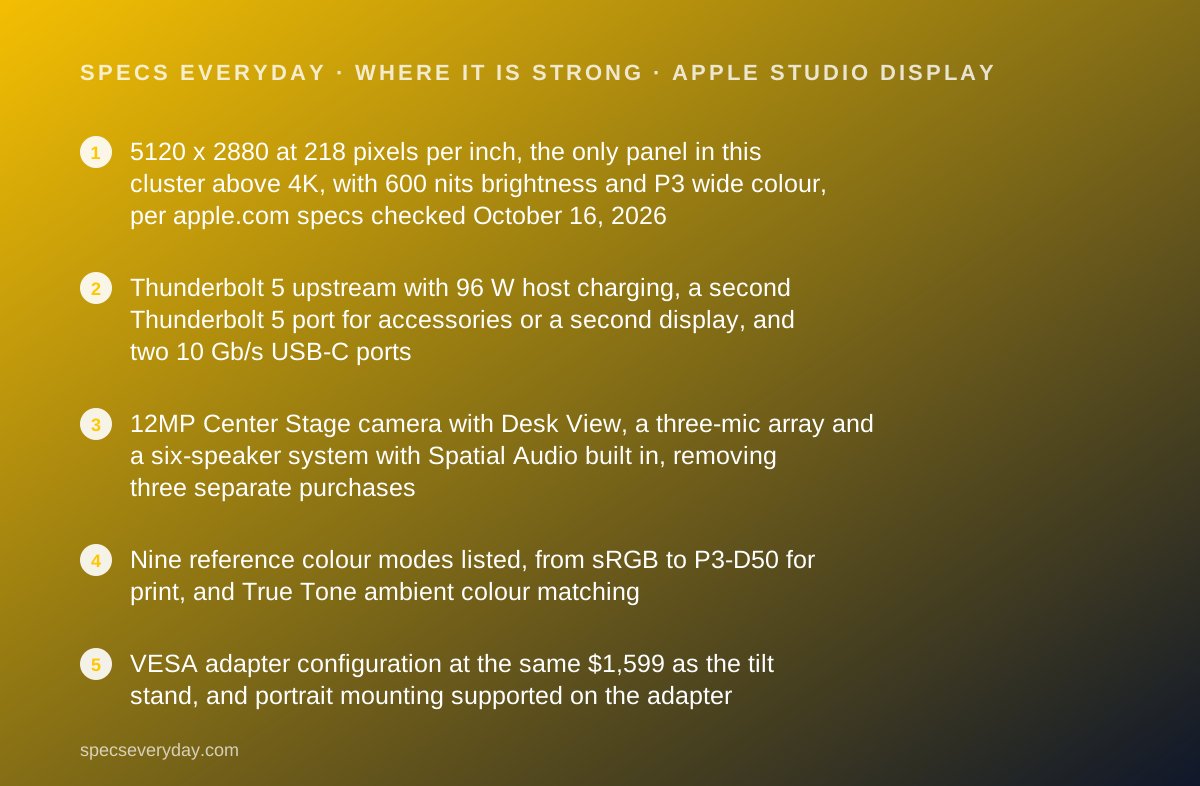
- 5120 x 2880 at 218 pixels per inch, the only panel in this cluster above 4K, with 600 nits brightness and P3 wide colour, per apple.com specs checked October 16, 2026
- Thunderbolt 5 upstream with 96 W host charging, a second Thunderbolt 5 port for accessories or a second display, and two 10 Gb/s USB-C ports
- 12MP Center Stage camera with Desk View, a three-mic array and a six-speaker system with Spatial Audio built in, removing three separate purchases
- Nine reference colour modes listed, from sRGB to P3-D50 for print, and True Tone ambient colour matching
- VESA adapter configuration at the same $1,599 as the tilt stand, and portrait mounting supported on the adapter
- Apple retail stores and the Apple Limited Warranty behind it, with AppleCare+ available
Where it falls short
- $1,599 to start and $1,999 with a height-adjustable stand; the three other monitors in this cluster cost $349.99 to $439.99 with height adjustment included
- 60 Hz refresh rate at any price; the Dell UltraSharp U2724D runs 120 Hz for $439.99
- Compatibility list names only Apple silicon Macs on macOS Tahoe 26.3.1 or later and recent iPads; Windows PCs get at best unlisted video output
- No HDMI or DisplayPort input of any kind: Thunderbolt or USB-C only
- One-year Apple Limited Warranty, against three years from Dell and BenQ; no HDR tier is listed despite 600 nits
At a glance
| Screen size | 27 in diagonal, 16:9 |
|---|---|
| Resolution | 5120 x 2880 (5K), 218 pixels per inch |
| Panel | LCD, 1 billion colours, P3 wide colour, True Tone; contrast ratio not published |
| Refresh rate | 60 Hz |
| Brightness | 600 nits; no HDR tier listed |
| Color gamut | P3 wide colour; reference modes for sRGB, BT.709, BT.601, P3-DCI, P3-D65, P3-D50 |
| USB-C power delivery | 96 W host charging over the upstream Thunderbolt 5 port |
| Video inputs | 1 x Thunderbolt 5 upstream (120 Gb/s); no HDMI, no DisplayPort |
| USB hub | 1 x Thunderbolt 5 downstream (120 Gb/s, daisy-chain capable), 2 x USB-C 10 Gb/s |
| Camera and audio | 12MP Center Stage camera with Desk View; three-mic array; six speakers with Spatial Audio and Dolby Atmos |
| Stand | Tilt stand: -5 to +25 degrees. Tilt and height stand: same tilt plus 105 mm height. VESA adapter: 100 x 100 mm, landscape or portrait |
| Weight | 13.9 lb tilt stand; 16.8 lb tilt and height stand; 11.9 lb VESA adapter |
| Compatibility | Apple silicon Macs on macOS Tahoe 26.3.1 or later; iPad Pro (M4, M5, 2018 onward), iPad Air (M2 onward, 5th gen); other devices may support video output |
| Warranty | Apple Limited Warranty, one year for Apple-branded hardware (apple.com/legal/warranty, October 2026); AppleCare+ optional |
| List price | $1,599, $1,899, $1,999, $2,299 depending on glass and stand (apple.com, checked October 16, 2026) |
| Pricing note | $1,599 with standard glass and tilt stand or VESA adapter; $1,999 with the tilt and height stand; nano-texture glass adds $300 to any option, topping out at $2,299 (apple.com, checked October 16, 2026) |
What the Apple Studio Display actually is
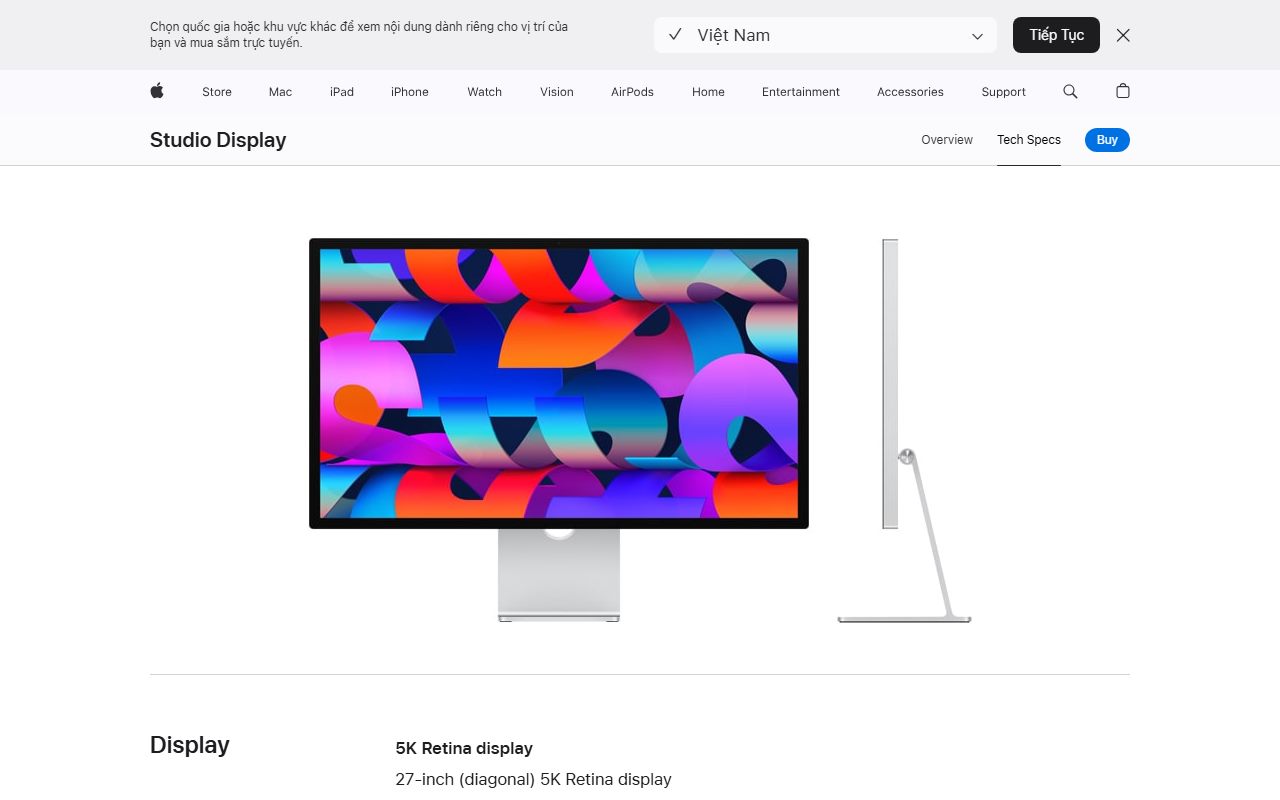
The Studio Display is Apple's only monitor under its Pro Display XDR, and the 2026 revision is the one on sale as this is written. Apple's spec page, read October 16, 2026, lists a 27-inch 5120 x 2880 Retina panel at 218 pixels per inch, 600 nits, one billion colours, P3 wide colour and True Tone, at 60 Hz.
It is also a webcam, a microphone and a speaker system. Apple lists a 12MP Center Stage camera with Desk View, a three-microphone array with beamforming and a six-speaker system with force-cancelling woofers and Spatial Audio.
The host connection is Thunderbolt 5 at 120 Gb/s with 96 W charging. A second Thunderbolt 5 port handles accessories or a chained display, and two USB-C ports run at 10 Gb/s. There is no HDMI and no DisplayPort.
The price list on Apple's store runs from $1,599 to $2,299. The three other monitors in this cluster, the Dell UltraSharp U2724D, the BenQ PD2706U and the LG 27UP850K-W, cost $349.99 to $439.99 on their makers' pages on the same day. This review is about whether anything in the Studio Display's spec sheet closes a gap that large.
Who the Studio Display is best for
Apple's own compatibility list draws the first boundary. Within it, these are the people the spec sheet serves.
- Owners of an Apple silicon Mac who want text at 218 ppi, the exact 2x scale macOS is designed around.
- People who take video calls all day and want a camera, microphones and speakers in the display rather than on the desk.
- Photographers and designers on a Mac who want P3 colour with named reference modes for print and web.
- Mac mini and Mac Studio owners, whose computers have no screen, camera or speakers of their own.
- Anyone mounting the display on an arm, since the VESA configuration costs the same as the tilt stand.
- Buyers who value one cable on the desk and one warranty counter at an Apple Store.
Who should skip it
Most office buyers fall into one of these groups and should read the Dell UltraSharp U2724D, BenQ PD2706U or LG 27UP850K-W review instead.
- Anyone on a Windows PC, or on any computer without a Thunderbolt or USB-C video output. Apple lists no HDMI or DisplayPort input.
- Anyone who wants height adjustment without paying $400 extra for it.
- Anyone who wants a refresh rate above 60 Hz or a warranty longer than one year.
The spec sheet, translated
Each line is from apple.com as read on October 16, 2026.
5120 x 2880 at 218 ppi. This is the reason the display exists. macOS renders its interface at exactly two device pixels per point at this density, so text is as crisp as on a MacBook Pro screen. A 27-inch 4K panel at 163 ppi has to scale by a fraction and looks slightly softer. Windows handles fractional scaling well, which is one reason the premium matters less there.
600 nits. The brightest panel in this cluster by 200 nits. Apple lists no HDR tier, so treat it as a bright SDR display for bright rooms rather than an HDR monitor.
P3 wide colour, True Tone, nine reference modes. The reference modes let you lock the display to sRGB for web work or P3-D50 for print. True Tone shifts white balance to match room lighting, which is a comfort feature that colour-critical users turn off.
60 Hz. The same as the BenQ and LG, half the Dell. Apple does not offer a faster panel at this size.
Contrast ratio. Apple does not publish one for the Studio Display. We do not estimate it.
Ports: one Thunderbolt cable, nothing else
Apple lists two Thunderbolt 5 ports at up to 120 Gb/s and two USB-C ports at up to 10 Gb/s. One Thunderbolt port is upstream to the host and delivers 96 W of charging; the other is downstream for high-speed accessories or a chained display.
96 W is the highest charging figure in this cluster and enough for every current MacBook Air and the 14-inch MacBook Pro at full speed. The 16-inch MacBook Pro, which ships with a 140 W adapter, will charge more slowly under heavy load.
The absence of HDMI and DisplayPort is the hard limit. There is no way to plug in a games console, a streaming box or a desktop graphics card with a standard video cable. The Dell, BenQ and LG all have at least one HDMI input and a DisplayPort input.
Apple's compatibility list is specific: Apple silicon Macs on macOS Tahoe 26.3.1 or later, and named iPad Pro and iPad Air models. The line that other devices may support video output depending on their capabilities is Apple's only statement about Windows laptops with Thunderbolt, and we treat it as no commitment.
How the pricing is structured
Apple's store listed six configurations on October 16, 2026. Standard glass with the tilt stand is $1,599. Standard glass with the VESA mount adapter is also $1,599. Standard glass with the tilt and height adjustable stand is $1,999. Nano-texture glass adds $300 to each: $1,899, $1,899 and $2,299.
By our arithmetic the height-adjustable stand is a $400 option, and the stand is not sold separately for later. Every other monitor in this cluster includes height adjustment in its base price. A good VESA monitor arm costs a fraction of $400, which is why the VESA configuration is the value choice for anyone willing to mount it.
Nano-texture glass is a matte etched finish for rooms with glare; Apple's spec page offers no further detail on it, so we cannot quantify the trade-off.
AppleCare+ is listed as an optional program with no price shown on the store page; accidental damage service fees are listed at $99 for screen or enclosure and $299 for other damage. Apple Card monthly instalments at 0% APR were offered as of October 1, 2026.
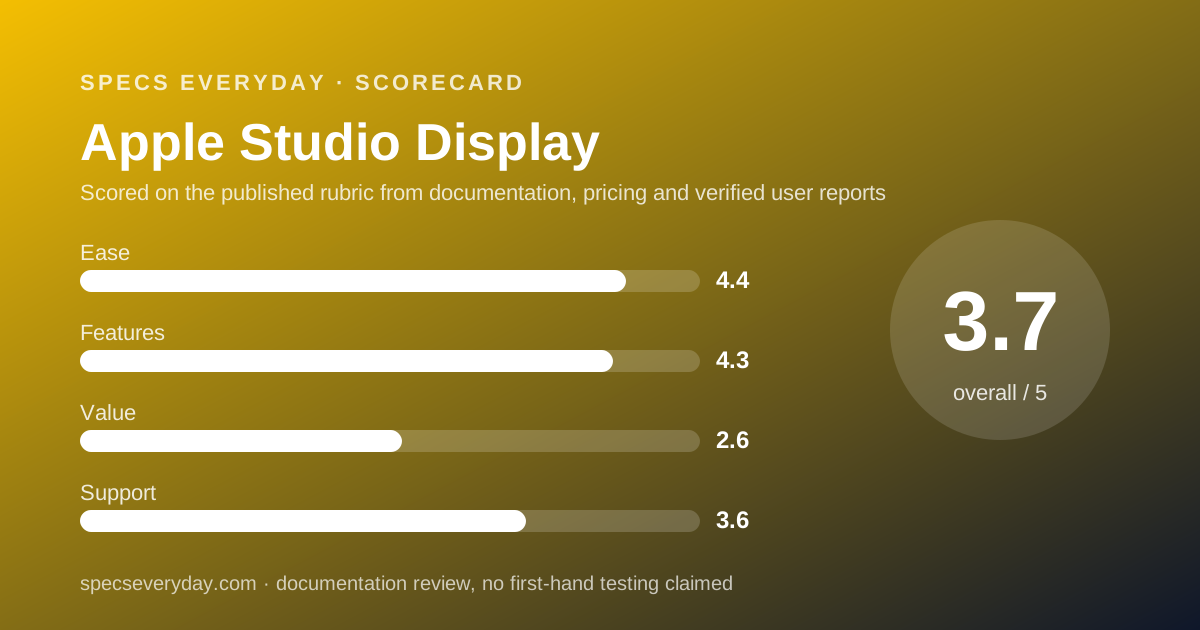
Ease of use: what the 4.4 is built from
For a Mac, the Studio Display is the simplest monitor in this cluster: one Thunderbolt cable carries video, charging, the camera, the microphones, the speakers and the USB hub, and macOS treats the display's camera and audio as built in. Brightness and True Tone are controlled from the Mac, not from buttons on the panel.
The tilt range is -5 to +25 degrees on both stands. The height stand adds 105 mm of travel. There is no swivel and no pivot on either stand; portrait use requires the VESA adapter.
The score loses ground on the stand pricing and on the lack of any on-display controls or inputs for a non-Apple device. On a Windows machine, ease of use is an open question Apple's documentation does not answer.
Features: what the 4.3 is built from
No other monitor here lists a camera, a microphone array, a six-speaker system, Spatial Audio, Thunderbolt 5 daisy-chaining and nine reference colour modes. The 5K panel and 600 nits are also unmatched in this cluster.
It loses points for 60 Hz, for no HDR tier despite the brightness, for no HDMI or DisplayPort, for no KVM, and for a stand that neither swivels nor pivots. The BenQ PD2706U lists a KVM and a desk controller; the Dell lists 120 Hz and IPS Black contrast; both cost a quarter as much.
Value: what the 2.6 is built from
At $1,599 the Studio Display costs about four times the BenQ PD2706U and more than four and a half times the LG 27UP850K-W on the days we checked their pages. With the height stand it is $1,999, roughly five times.
What the premium buys, per Apple's own spec sheet: 5K instead of 4K, 600 nits instead of 350 to 400, a camera, microphones and speakers, Thunderbolt 5 and 96 W. A reasonable 4K USB-C monitor plus a good webcam and a pair of desk speakers still costs well under half of $1,599.
The value score reflects that arithmetic. It is not a judgement on the panel, which on paper is the best in this cluster. It is a judgement on what the same money buys elsewhere, and on a one-year warranty attached to a $1,599 purchase.
Support: what the 3.6 is built from
Apple's US limited warranty for Apple-branded hardware states one year from the date of original retail purchase. The Studio Display store page describes AppleCare+ as a separate optional program and lists accidental damage fees.
One year is the same as LG and a third of what Dell and BenQ list. What Apple adds is a retail store network for walk-in service and a support site with a dedicated 2026 Studio Display spec page and manuals, both read October 16, 2026.
We did not read a verified user-review source for the 2026 model on the day of writing, so we do not quote reported repair experiences.
Limits stated by the vendor
Apple's pages carry these limits. Compatibility is listed as Apple silicon Macs on macOS Tahoe 26.3.1 or later and named iPads; other devices may support video output. No HDMI or DisplayPort input. Weight varies by configuration and manufacturing process. The nano-texture option is listed without further detail. Contrast ratio is not published.
Apple's warranty excludes damage from accident and misuse, which is what AppleCare+ covers for the listed fees.
Alternatives
BenQ PD2706U. Choose the BenQ if you want 4K, 90 W USB-C charging, a KVM and a three-year warranty for $399.99, and can live without the camera and speakers. Otherwise choose the Studio Display if you are on a Mac and 218 ppi matters to you. Our BenQ PD2706U review has the full list.
Dell UltraSharp U2724D. Choose the Dell if your computer is a desktop or docked laptop and you want 120 Hz and 2,000:1 contrast with three-year cover at $439.99. It has no USB-C video, so it is not a single-cable Mac monitor. Our Dell UltraSharp U2724D review explains that limit.
LG 27UP850K-W. Choose the LG if $349.99 is the budget and you want the brightest 4K panel under $500 with 90 W USB-C. Otherwise the Studio Display's 600 nits and 5K are a different tier at a different price. Our LG 27UP850K-W review covers it.
Bottom line
The Apple Studio Display has the best spec sheet in this cluster: 5K at 218 ppi, 600 nits, Thunderbolt 5 with 96 W charging, a 12MP camera, three microphones and six speakers, for $1,599 to $2,299 on apple.com as of October 16, 2026.
It is worth that only to an Apple silicon Mac owner who wants all of those things in one piece of glass. For an office desk with a Windows PC, a docked laptop or a budget, the Dell UltraSharp U2724D, BenQ PD2706U and LG 27UP850K-W do the job for a quarter of the price.
This is a documentation review. Figures are Apple's, read from apple.com on October 16, 2026, and may have changed since.
Buy it if
- You use an Apple silicon Mac and want the sharpest text available at 27 inches - 218 ppi is a third denser than the 163 ppi of the BenQ PD2706U and the LG 27UP850K-W.
- You want the webcam, microphones and speakers built in - the camera, three-mic array and six speakers replace three purchases and three cables.
- You can mount it on an arm - the VESA adapter configuration costs the same $1,599 as the tilt stand and avoids the $400 height-stand premium.
- Your desk faces a bright window - 600 nits is 200 above the brightest other panel in this cluster.
Skip it if
- Your computer runs Windows or connects over HDMI or DisplayPort - Apple lists no such inputs and names only Macs and iPads as supported hosts.
- You want height adjustment without a $400 surcharge - the Dell UltraSharp U2724D, BenQ PD2706U and LG 27UP850K-W all include it.
- You want 120 Hz - the Studio Display is 60 Hz at every price; the Dell is 120 Hz at $439.99.
Frequently asked
How much does the Apple Studio Display cost in 2026?
Apple's US store, checked October 16, 2026, listed six prices: $1,599 for standard glass with the tilt stand or the VESA adapter, $1,999 with the tilt and height stand, and $300 more for nano-texture glass on each, so $1,899, $1,899 and $2,299. The height stand is a $400 option.
Does the Studio Display work with a Windows PC?
Apple's compatibility list names Apple silicon Macs running macOS Tahoe 26.3.1 or later and specific iPads. It adds that other devices may support video output depending on their capabilities, and lists no HDMI or DisplayPort input. We do not list it as a Windows monitor on that basis.
Is the Studio Display 4K?
No, it is 5K: 5120 x 2880 at 218 pixels per inch, per apple.com specs. That is about 78% more pixels than a 3840 x 2160 panel by our arithmetic, and it lets macOS run at an exact 2x scale, which is why text looks sharper than on a 27-inch 4K monitor.
Does the Studio Display charge a MacBook?
Yes. Apple lists 96 W host charging over the upstream Thunderbolt 5 port, which also carries the video signal and the USB hub. A 1 m Thunderbolt 5 Pro cable is listed in the box. That is the highest charging figure in this cluster; BenQ and LG list 90 W.
What is the Studio Display warranty?
Apple's US warranty document for Apple-branded hardware states one year from the date of original retail purchase, read October 16, 2026. The store page calls AppleCare+ an optional program separate from the limited warranty and lists accidental damage fees of $99 for screen or enclosure and $299 for other damage.
Is the 2026 Studio Display different from the 2022 one?
Per Apple's support spec pages, the 2026 model lists two Thunderbolt 5 ports at 120 Gb/s plus two 10 Gb/s USB-C ports, where the 2022 model listed one Thunderbolt 3 port and three USB-C ports. Display size, 5K resolution, 600 nits, the camera and the stand options are unchanged on the spec sheets.
Sources
- Apple Studio Display technical specifications - checked October 16, 2026
- Apple Store: Buy Studio Display (configurations and prices) - checked October 16, 2026
- Apple Support: Studio Display (2026) tech specs - checked October 16, 2026
- Apple one-year limited warranty for Apple-branded hardware (US) - checked October 16, 2026
Update history
- October 16, 2026 - First published from Apple's spec, store, support and warranty pages for the 2026 model.
Visit Apple Studio Display
We have no affiliate relationship with this vendor. Link goes to the official site.